The built-in RTC clock in STM32 has so many features that I had to split their description into two posts. Previously, I showed you the cool stuff related to “break-ins”. This time we’ll wake the sleeper up 🙂
“Wake-up” RTC features in STM32F4
Now we’ll take a look at two similar, yet different clock features that can wake us up—but not only us:
- Wake Up
- Alarms
Let me base this on the board I chose in the previous article. It’s the so-called BlackPill with an STM32F401 on board. You can buy such a board (or a slightly more powerful one) from me.

The software I’ll use is:
- STM32CubeIDE v1.2.0
- STM32CubeMX v5.5.0 built into the IDE
- HAL F4 v1.24.2
I’ll also base this on the project I created for STM32F4.
Wake Up in STM32
The name itself gives away what it’s for. The Wake Up function is used to wake the microcontroller from low-power modes. In this mode, not all clocks or peripherals are running. A lot depends on which mode we choose. The F series has a modest list of possibilities in this regard, but the L series already has tons of combinations of these modes.
Using this function, in short, comes down to setting the appropriate timer in the RTC and entering sleep mode. After the specified time elapses, our microcontroller will be woken up by an interrupt, which of course we can handle—unless it’s an “aggressive” Low Power mode in which memories are not retained and the program starts from the beginning.
How to set it up? In Cube you need to select that you want to use Wake Up.
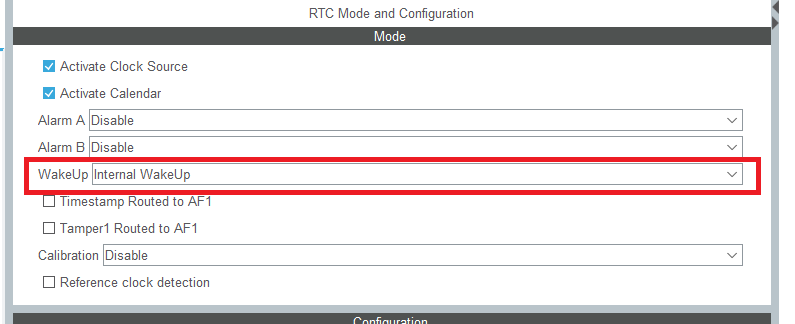
A Wake UP section will appear in the configuration, where you can set the clock for the dedicated Timer and the counter itself.

For tests I selected the RTC clock divided by 16. The larger the divider (smaller clock), the less energy the RTC Wake Up module will consume while the MCU is asleep.
Don’t set the counter itself in Cube. That actually makes no sense. Why?
First, we don’t want to wake up right after program start, when we still don’t know when we’re going to sleep. Cube unfortunately sets the clock immediately during initialization and enables its interrupt. Total nonsense.
Second, in the RTC initialization function we have an earlier return inserted a bit above, so as not to overwrite the date and time with values from Cube, so the code will never reach the WakeUp timer setup.
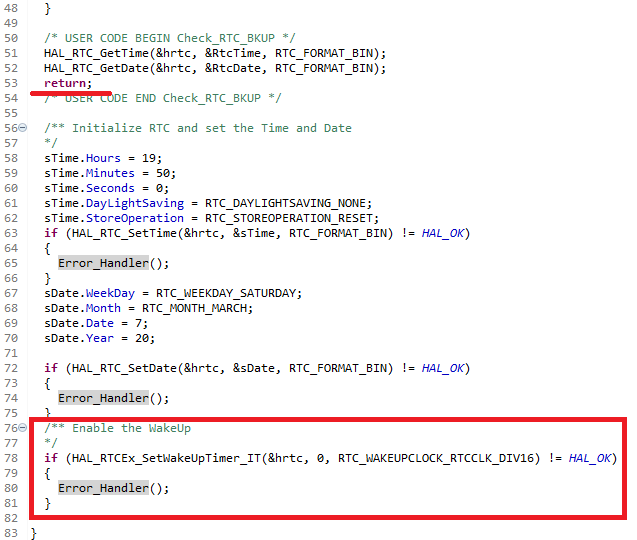
So when and how to use it?
You set it right before entering sleep. For this, I created a special function Enter_LowPowerMode in user section #4, where I set the WakeUp counter and enter STOP Mode. I based it on an example from the HAL library.
void Enter_LowPowerMode(void)
{
  /*## Enter STOP low power Mode ##########################################*/
  /**
  RTC Wakeup Interrupt Generation:
  Wakeup Time Base = (RTC_WAKEUPCLOCK_RTCCLK_DIV /(LSE or LSI))
  Wakeup Time = Wakeup Time Base * WakeUpCounter
              = (RTC_WAKEUPCLOCK_RTCCLK_DIV /(LSE or LSI)) * WakeUpCounter
  ==> WakeUpCounter = Wakeup Time / Wakeup Time Base

  To configure the wake up timer to 5 s the WakeUpCounter is set to 0x2FA8:
  RTC_WAKEUPCLOCK_RTCCLK_DIV = RTCCLK_Div16 = 16
  Wakeup Time Base = 16 /(~32.000KHz) = ~0,5 ms
  Wakeup Time = 5 s = 0,5ms  * WakeUpCounter
  ==> WakeUpCounter = 5/0,5ms = 0x2710
	**/
  HAL_RTCEx_SetWakeUpTimer_IT(&hrtc, 0x2710, RTC_WAKEUPCLOCK_RTCCLK_DIV16);

  HAL_SuspendTick();      			/* To Avoid timer wake-up. */

  /**
	In PWR_MAINREGULATOR_ON mode, we measure 13.8/15.2uA on JP6
	**/
  HAL_PWR_EnterSTOPMode(PWR_MAINREGULATOR_ON,PWR_STOPENTRY_WFI);

  /**
  In PWR_LOWPOWERREGULATOR_ON mode, we measure 1.3/2.7uA on JP6
  HAL_PWR_EnterSTOPMode(PWR_LOWPOWERREGULATOR_ON,PWR_STOPENTRY_WFI);
	**/

  /* We are now waiting for TAMPERF1 or WAKEUP interrupts (or Reset) */

  HAL_ResumeTick();       /* Needed in case of Timer usage. */
  HAL_RTCEx_DeactivateWakeUpTimer(&hrtc);

  SystemClock_Config();   /* Re-configure the system clock */
}
In the comments you can see that you need to calculate the counter value that we set. There is a simple formula for this.
- Wakeup Time Base = (RTC_WAKEUPCLOCK_RTCCLK_DIV /(LSE or LSI)), i.e., the base tick of the WakeUp timer. I chose a divider of 16 and I use the internal oscillator, so 16/32000 = 0.0005 s, i.e. 0.5 ms.
- Wakeup Time = Wakeup Time Base * WakeUpCounter, i.e., the time after which the MCU should wake up. If you want it to do this about every 5 seconds, then the formula looks like this
5 = 0.0005 * WakeUpCounter - WakeUpCounter = Wakeup Time / Wakeup Time Base, i.e. by mathematically swapping sides our calculations will look like this
WakeUpCounter = 5 / 0.0005 = 10000 (dec) = 0x2710 (hex) and this value must be entered into the Wake Up counter
Before entering STOP Mode it’s worth stopping SysTick, because its interrupt can also wake the MCU 🙂
The HAL_PWR_EnterSTOPMode function enters STOP Mode with the possibility of waking up via interrupt, so the RTC WakeUp interrupt is able to wake our MCU. What happens right after that function is executed after waking up.
After waking up, I resume SysTick, disable WakeUp, and continue. The test program happens to cyclically put the MCU to sleep and wake it. In the terminal it looks like this.
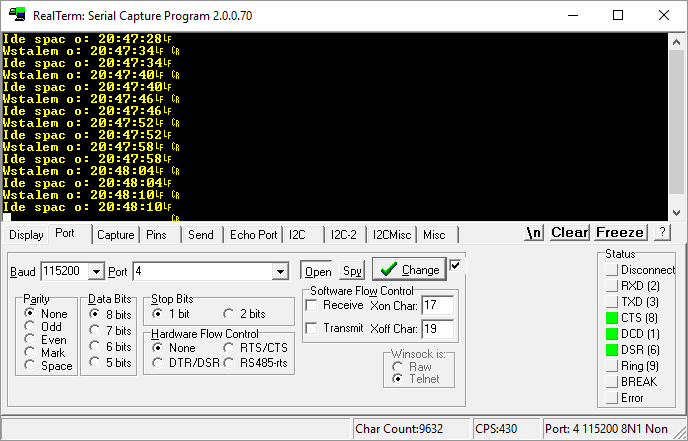
It wakes up and falls asleep. That’s a magician’s role. You can find the full example code here.
RTC Alarm in STM32F4
The last function I wanted to show you is the Alarm. It works similarly to an alarm clock that you set every evening.
When the clock matches the alarm, an interrupt is generated. This interrupt can of course be handled, or used to wake the microcontroller from sleep. How to enable the alarm?
You just have to… enable it in Cube 🙂
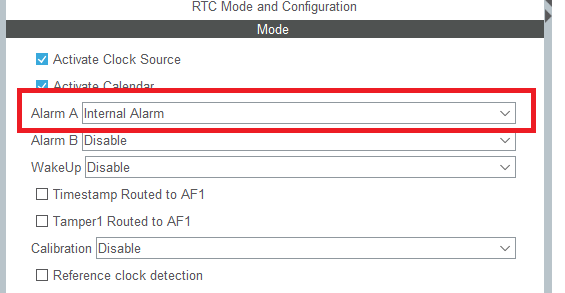
This setting causes the alarm signaling to be routed internally within the MCU. You can also activate the alarm on a microcontroller pin.
Of course, additional configuration related to the Alarm will appear.
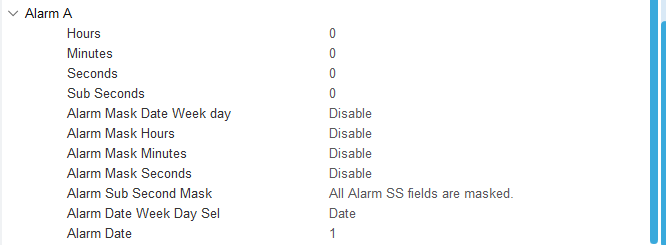
Here you’ll find settings not only for time and date. You can set a bit more combinations, such as generating an alarm every minute. All of this using masks. I recommend playing around and testing.
However, it’s much better to set the alarm from code, and that’s what I did. I wrote a simple function that sets the alarm five seconds ahead of the current time. Note: this doesn’t work long-term. When the hour changes, the algorithm already falls apart. Writing a well-working algorithm was not my goal 🙂
I use a separate function for this.
void SetNextAlarm(void)
{
	RTC_AlarmTypeDef sAlarm = {0};

	/** Enable the Alarm A
	 * WARNING: It doesn't work if hour changes and further.
	*/
	sAlarm.AlarmTime.Hours = RtcTime.Hours;
	sAlarm.AlarmTime.Minutes = RtcTime.Minutes + ((RtcTime.Seconds + 5) / 60);
	sAlarm.AlarmTime.Seconds = (RtcTime.Seconds + 5) % 60;
	sAlarm.AlarmTime.SubSeconds = 0;
	sAlarm.AlarmTime.DayLightSaving = RTC_DAYLIGHTSAVING_NONE;
	sAlarm.AlarmTime.StoreOperation = RTC_STOREOPERATION_RESET;
	sAlarm.AlarmMask = RTC_ALARMMASK_NONE;
	sAlarm.AlarmSubSecondMask = RTC_ALARMSUBSECONDMASK_ALL;
	sAlarm.AlarmDateWeekDaySel = RTC_ALARMDATEWEEKDAYSEL_DATE;
	sAlarm.AlarmDateWeekDay = RtcDate.Date;
	sAlarm.Alarm = RTC_ALARM_A;
	if (HAL_RTC_SetAlarm_IT(&hrtc, &sAlarm, RTC_FORMAT_BIN) != HAL_OK)
	{
		Error_Handler();
	}
}
Meanwhile, I handle the alarm in such a way that in its interrupt I only set a global flag.
void HAL_RTC_AlarmAEventCallback(RTC_HandleTypeDef *hrtc)
{
	AlarmFlag = 1;
}
And I handle this flag in the main loop between reading the current time from the RTC.
  /* USER CODE BEGIN WHILE */
  while (1)
  {
	  HAL_RTC_GetTime(&hrtc, &RtcTime, RTC_FORMAT_BIN);
	  Milliseconds = ((RtcTime.SecondFraction-RtcTime.SubSeconds)/((float)RtcTime.SecondFraction+1) * 100);
	  HAL_RTC_GetDate(&hrtc, &RtcDate, RTC_FORMAT_BIN);

	  if(RtcTime.Seconds != CompareSeconds)
	  {
		  MessageLen = sprintf((char*)Message, "Date: %02d.%02d.20%02d Time: %02d:%02d:%02d:%02d\n\r", RtcDate.Date, RtcDate.Month, RtcDate.Year, RtcTime.Hours, RtcTime.Minutes, RtcTime.Seconds, Milliseconds);
		  HAL_UART_Transmit(&huart2, Message, MessageLen, 100);
		  CompareSeconds = RtcTime.Seconds;
	  }

	  if(AlarmFlag == 1)
	  {
		MessageLen = sprintf((char*)Message, "Alarm?! I'll set snooze for 5 seconds...\n\r");
		HAL_UART_Transmit(&huart2, Message, MessageLen, 100);

		SetNextAlarm();
		AlarmFlag = 0;
	  }

	  if(GPIO_PIN_RESET == HAL_GPIO_ReadPin(TEST_GPIO_Port, TEST_Pin))
	  {
		 while(GPIO_PIN_RESET == HAL_GPIO_ReadPin(TEST_GPIO_Port, TEST_Pin))
		 {}
		 SetRTC();
	  }
    /* USER CODE END WHILE */

    /* USER CODE BEGIN 3 */
  }
  /* USER CODE END 3 */
The result?
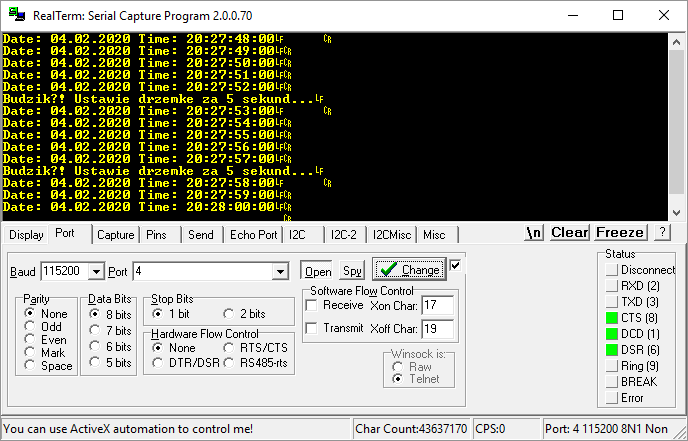
Snooze every 5 seconds. Feels like me every morning 🙂
You can find the full example code here.
Summary
You’ve learned two more features of the built-in RTC. Alarms can remind us about certain things far in the future. Thanks to this, we relieve the CPU from constantly checking “is it time yet?”. The Wake Up function can turn out to be incredibly useful in battery-powered devices.
You can find the full project along with the library as usual on my GitHub: LINK
If you noticed an error, disagree with something, would like to add something important, or simply feel like you’d like to discuss this topic, write a comment. Remember that the discussion should be polite and in accordance with the rules of the Polish language.
Podobne artykuły







0 Comments