In the previous post I started a mini-series dedicated to the built-in RTC in STM32 chips. I began with probably the most popular microcontroller SMT32F103 found among others in the cheap BluePill board. I got to the point where after resetting the microcontroller the time was still correct, but the date started from zero.
Why is the date being reset?
Alright, I’m only resetting the MCU, so the RTC counter keeps running. So why does the time match after reset, but the date does not?
It comes from the way ST uses the built-in RTC counter. Let me remind you that it’s used in such a way that when a day rolls over, the counter is reset. It simply does not hold a complete date like it does in Linux.
That’s why the time is preserved after reset. The date is stored in an ordinary variable in RAM, which is reset when the microcontroller starts. And that is the cause of the “problem”. How do we fight it?
Let’s finally use the Backup Registers!
I’ve mentioned backup registers a few times already. Let me remind you that these are a dozen/several dozen battery-backed registers. Additionally, clearing these registers requires a special procedure, which is not included in a normal MCU reset.
Writing to these registers also requires unlocking. In HAL, this lock is removed by default. This is done in the HAL_RTC_MspInit function
HAL_PWR_EnableBkUpAccess();
Since the lock is removed, we can write to these registers. It’s very simple. Just use the HAL function from the extended RTC function set.
You pass the RTC handle, the backup register number, and the data. Unfortunately, the argument is misleading, because it points to a 32-bit variable that you can put into the register. BKP holds ONLY 16 bits.
By the way, these ubiquitous 32-bit arguments are a plague of HAL, which opponents use to start flame wars on electronics forums. I partly agree with them, but come on—it doesn’t completely eliminate HAL 🙂
Ok, so how do you write the current date into these registers? Since they fit 2 bytes each, and each date variable fits in one byte, two backup registers are enough to store the complete date. I made this simple function in main.
Now it’s enough to read this data at startup and set it using the function we already know, HAL_RTC_SetDate. Let’s try it!
In the /* USER CODE BEGIN Check_RTC_BKUP */ section in the RTC initialization—where last time I inserted a return so as not to set the clock with the data entered in Cube—I’ll add some code. I’ll read the saved date from the BKP regs and set the calendar.
/* USER CODE BEGIN Check_RTC_BKUP */
RtcDate.Date = (HAL_RTCEx_BKUPRead(&hrtc, RTC_BKP_DR2) >> 8);
RtcDate.Month = HAL_RTCEx_BKUPRead(&hrtc, RTC_BKP_DR2);
RtcDate.Year = (HAL_RTCEx_BKUPRead(&hrtc, RTC_BKP_DR3) >> 8);
RtcDate.WeekDay = HAL_RTCEx_BKUPRead(&hrtc, RTC_BKP_DR3);

HAL_RTC_SetDate(&hrtc, &RtcDate, RTC_FORMAT_BIN);

//
//  You have to do not let Init code to reinitialize Time and Date in RTC.
//  It's "a bug" in HAL widely described and complain on forums.
//  That causes every MCU restart the time and date will be same as you configured in CubeMX.
//  All you have to do is just return before init time/date in this user section.
//
  return;
/* USER CODE END Check_RTC_BKUP */
This code will cause the date to be remembered after a microcontroller reset. Success! …until…
Date rollover vs. backup
What happens if, during battery backup power, the date rolls over? By one, two, or 20 days? Before we move on to battery backup power, let’s test this by simulating such a situation in the debugger. How? By changing the values in the RTC counter, simulating a date rollover “in the absence” of the core.
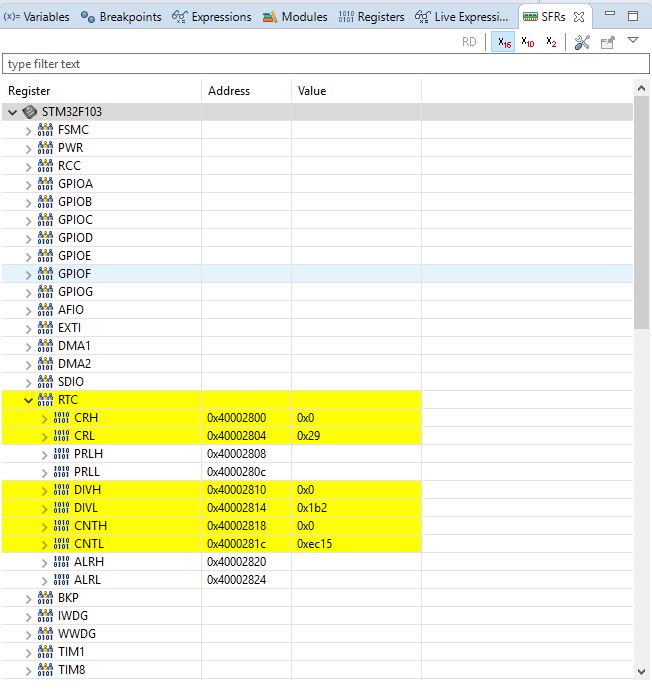
To change the register, start debugging and pause code execution. Now in the upper-right corner you have several sections. Go into SFRs. These are Special Function Registers, i.e., simplified, you can say these are peripheral registers. Expand the tree for RTC.
The three registers we care about are – CRL, CNTH and CNTL.
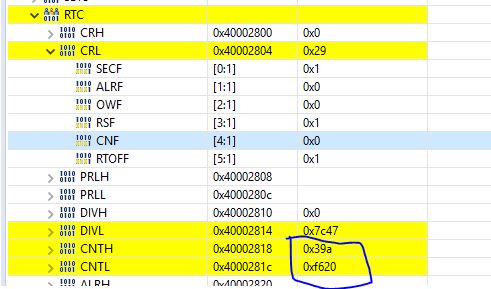
CRL – this is the control register for RTC. We’ll need it so that RTC allows us to write our value into the counter. This is done with bit 4, i.e., CNF.
CNTH and CNTL – the upper and lower RTC counters. Both 16-bit. This is where RTC counts seconds.
Now, to change the counter value you need to:
Set the CNF bit of the CRL register to 0x1
Modify the CNTH and CNTL values – in Eclipse they will “return” to their values after you enter them
Clear the CNF bit of the CRL register (0x0) to latch the introduced changes in the counter.
By how much should we increase the RTC counter? We want to check changes by a day or a few. One day is 86400 seconds, so that’s how much you need to add to the counter for each day to simulate a day change.
I’ll add 2 days and a few seconds – I’ll set the counter to 180000. CNTH = 0x2, CNTL = 0xBF20.
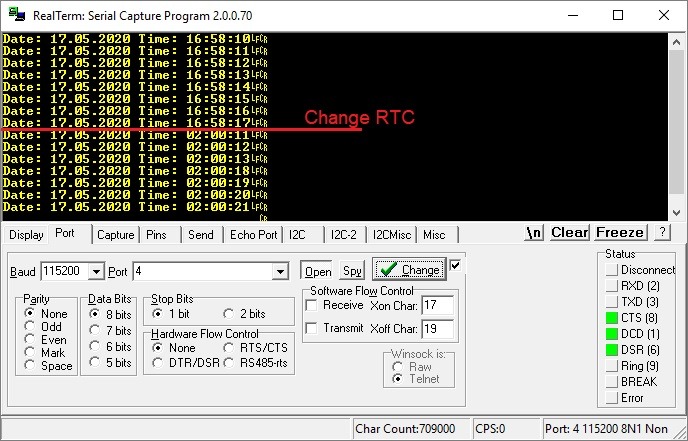
Before the change, during pause I have the date set to 17.05.2020 and the time 16:58:17 (I jumped into the future). Now I’ll change the counter and reset the MCU. This is exactly the MCU power coming back while the RTC is on battery backup power.
What happened?
Damn, something is wrong! The time changed, but the day was not updated. How is that possible? We remembered the date in the backup register.
This is where the weakness of ST’s solution shows up… The problem is in the HAL_RTC_SetDate function. Inside this function, the RTC counter is corrected, which in short consists of CUTTING OFF THE ELAPSED DAYS. This causes the number of elapsed days to disappear from the RTC counter and it is not transferred to the date in any way. SCANDAL!
This is a terrible problem, because even using backup registers we are still not able to easily control the date. There are two solutions:
Write your own RTC handling, which will be better thought out.
Do a bit of code gymnastics and recover the date without modifying ST’s code (HAL and the RTC lib).
Let me do the second option. Just for practice and to show that you can still use the library generated by Cube.
Full date recovery
Oh, HAL opponents will hate me, because I’m going to make a workaround now involving adding many clock cycles. But maybe they’ll praise me for ingenuity 🙂 Feel free to discuss.
I will need two RTC_DateTypeDef variables:
RtcDate, which I use everywhere in the later code. This is the target variable that should contain the date.
BackupDate – a temporary variable for calculations.
Everything will happen in RTC initialization. After MCU startup, I collect the backup registers into the target variable.
In the next step I collect the time, which is correct, into the target time variable. At this moment a new date is also calculated based on the RTC counter. By adding 2 days, it will be January 3rd of year 00, because ST’s software calendar counts from January 1st of year 00.
Now I collect that date into the temporary backup variable.
HAL_RTC_GetTime(&hrtc, &RtcTime, RTC_FORMAT_BIN); // There is also an internal date update based on HW RTC time elapsed!!
HAL_RTC_GetDate(&hrtc, &BackupDate, RTC_FORMAT_BIN); // Days elapsed since MCU power down
Now it’s enough to add these 2 days to our target calendar variable and everything is great? Yes! Only… what if it’s so many days that in the new date the month or year rolls over. The calculations become complicated…
Operations on the number of elapsed days
I found two useful algorithms operating on integers. They do have some issues with year zero, but that can be worked around.
The first function, CalculateDayNumber , is supposed to return the day number from the beginning of the calendar based on the date.
The second returns the date based on the day number.
To avoid strange errors around year zero, I added and subtracted 20 years in both functions. 20 because, like year zero, it is a leap year. So there won’t be errors because of that.
To the target date, it’s enough to add the days that elapsed. However, you need to subtract January 1st due to the fact that inside the algorithm we are actually counting the day 20 years ahead (due to errors for year 0000).
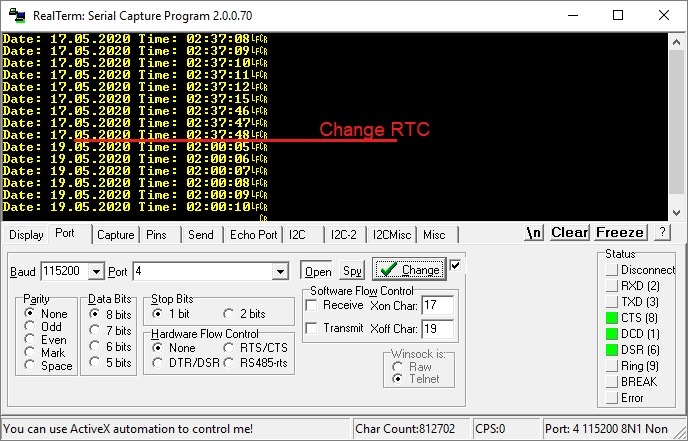
Now the date will always (in 99%) be correct. I’ll test again by entering 180000 into RTC.
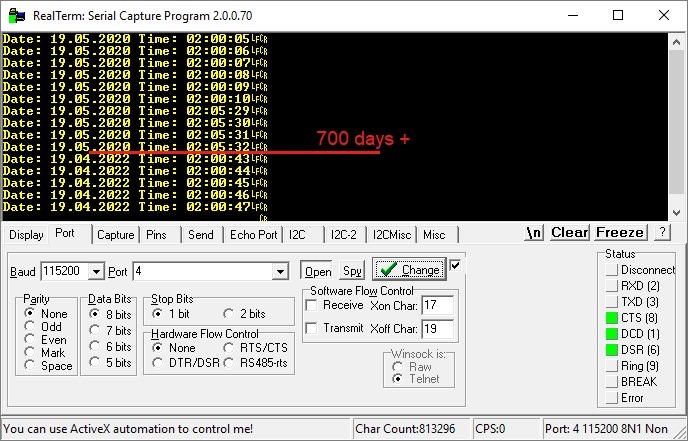
Does it always work? I won’t bet my hand on it. Buuuut let’s try adding… 700 days, shall we?
19.05.20 + 700 days = 19.04.22 according to the calculator.
700 days * 86400 seconds = 60480000 seconds (0x39ADA00). Plus 2 hours gives 60847200 (0x39AF629) and I’ll enter that value into RTC.
So what? It works!
Summary
Using ST’s library is quite a challenge. The creators of our favorite STMs pulled a nasty trick on us by delivering such a hard-to-use library. However, contrary to what the smartest guys say – it can be used.
Also remember that this is the case for the poorest RTC, where there is only a seconds counter. In STM32F4 there is already a hardware calendar. I will definitely test it in the next posts.
The article grew again. There are still two issues left. Battery backup, which is not as trivial as one might expect, and driving RTC with an external crystal, which on BluePill will also cause a few problems. That’s for the next post!
In the meantime, I invite you to the comments section. Let me know if you liked this post and whether it makes sense to create articles like this. Every comment is valuable to me.
The full project along with the library can be found as usual on my GitHub: LINK
If you noticed any mistake, disagree with something, would like to add something important, or simply feel you’d like to discuss this topic, write a comment. Remember that the discussion should be polite and in accordance with the rules of the Polish language.
Podobne artykuły
Grayscale OLED on SSD1327, Part 3
Inexpensive HC-SR04 Ultrasonic Rangefinder
Why I Don’t Write Posts Based on the BluePill Board?
Darmowy ebook
Dołącz do mojej listy mailowej aby otrzymać darmowy ebook "Pierwsze kroki z STM32".
Udało się!
Potwierdź w emailu dołączenie do mojego newslettera!
In mid-July 2025, together with several leading creators from the embedded industry, we had the opportunity to visit the STMicroelectronics factory in Agrate, Italy. How did it happen? …well, I know 😅 This visit had Read more
UART Communication on STM32. Transmission to PC | STM32 on Registers #6 We have already learned the basic operations on GPIO, as well as ways to delay individual tasks. Today we will go beyond the Read more
Doing 3 Things at Once, or How to Implement a Software Timer? | STM32 on Registers #5 Let’s get to know one of the effective ways not to block the processor’s work by waiting. It Read more
The msalamon.pl blog uses cookies. By using the website, you consent to the use of cookies. More information can be found on the Privacy Policy page. Do not acceptAccept
Privacy Policy & Cookies
Privacy Overview
This website uses cookies to improve your experience while you navigate through the website. Out of these cookies, the cookies that are categorized as necessary are stored on your browser as they are essential for the working of basic functionalities of the website. We also use third-party cookies that help us analyze and understand how you use this website. These cookies will be stored in your browser only with your consent. You also have the option to opt-out of these cookies. But opting out of some of these cookies may have an effect on your browsing experience.









0 Comments