The topic of UART combined with DMA keeps coming back like a boomerang. Especially receiving data on a microcontroller causes the most problems. Why? Because we don’t know how much data will arrive. That’s why receiving via DMA is a somewhat poor idea, because we have to specify in advance the amount of data being received. But not always…
UART combined with DMA
Some time ago I wrote about a great use of DMA reception combined with the UART interrupt for the idle state, i.e. IDLE. On my blog you’ll find two articles on how to write such a mechanism for F4 (here) and F1 (here) microcontrollers. Let me briefly remind you what such a setup is about.
We configure the UART to work with DMA so that it can send transfer requests to the DMA.
We enable the UART idle interrupt, i.e. IDLE.
We configure the DMA to read from the UART DR register and write somewhere into a prepared array in RAM (with increment).
We enable reception from the UART via DMA.
Reception can end at two moments
We received a predetermined number of characters – we get a DMA Transfer Complete interrupt
We received fewer characters, but the UART entered the idle state on the RX line – we get a UART IDLE interrupt
In the end, we get an interrupt after reception finishes regardless of how many characters we received. So we know the moment when we should deal with that data. Great, isn’t it?
Register-level implementation
In the previous posts about STM32F4 and STM32F1 I did it manually using registers. Why? Well, the HAL libraries didn’t support the IDLE interrupt at all. You had to rely on your own implementation and add IDLE interrupt handling on the UART.
Such an approach came with a lot of drawbacks and imperfections.
First, it isn’t a universal solution, as my course participants found out. People working on STM32L4 or STM32F7 ran into the problem of registers looking slightly different. For each microcontroller you basically need a separate approach and a separate implementation, because there were small nuances in how DMA or the UART worked. That can be a pain.
Second, my implementation was not resistant to the fact that IDLE also occurred after receiving exactly the number of characters requested via DMA. We were already handling the received data in the DMA interrupt, and then IDLE came in and de facto I did the same thing a second time…
We could use something more universal and working, right? Something that will work for every STM32 family. It’s already here!!!
UART IDLE in HAL libraries
At the end of 2020, ST Microelectronics finally added support for the UART IDLE interrupt! For all families. This means for us – programmers – consistent usage of this interrupt and its handling regardless of the microcontroller family.
All of this, as usual for HAL, is done “for us”. In the sense that we request reception with a special function and we have a special Callback available. It is called in two situations: DMA Transfer Complete and UART Idle.
Requesting reception is very similar to the usual way of starting DMA reception. Simply, after enabling reception on DMA, the IDLE interrupt is enabled. Along the way, information is also set that it was a reception mode with IDLE, so that HAL knows what to do in the interrupt handler.
What does the interrupt code look like? First, HAL checks in the UART structure whether reception was requested with IDLE. If yes, it will also check and clear that flag. Then it checks whether this was reception using DMA, because that also matters, and it clears the appropriate flags. At the end it calls the special Callback.
Let’s set up DMA reception with IDLE
First, we need to play with CubeMX. I’ve been using STM32CubeIDE for a long time, so CubeMX is built into it.
What will I base my work on today? I have a Nucleo-F411RE on hand, which I use among other things in my STM32 Course for Beginners (the course content is conducted in Polish). STM32CubeIDE version 1.6.0 and HAL F4 libraries v1.26.1.
First, we need to have the UART configured. If you create a project by default by selecting Nucleo, you already have UART2 configured at 11520. You need to add two things to it.
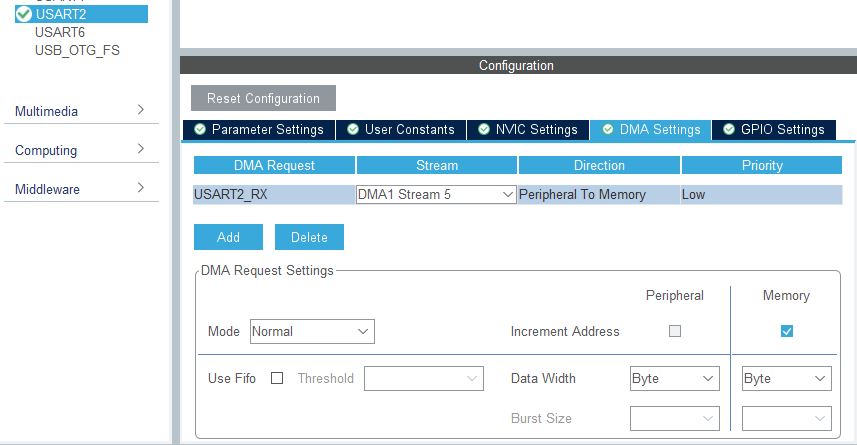
Of course, you need to set DMA for the USART2_RX receive line. Do exactly as I do, i.e. with auto-increment on the memory side.
The stream/channel number doesn’t matter much. We only want to receive something on UART, so nothing else will interfere with us.
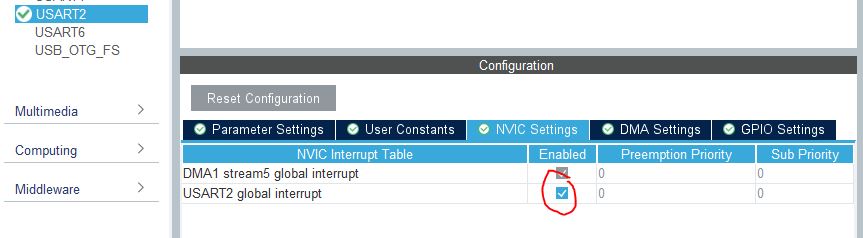
Next, you need to enable UART interrupts. After all, we want to use the UART IDLE interrupt. The DMA interrupt is enabled by default.
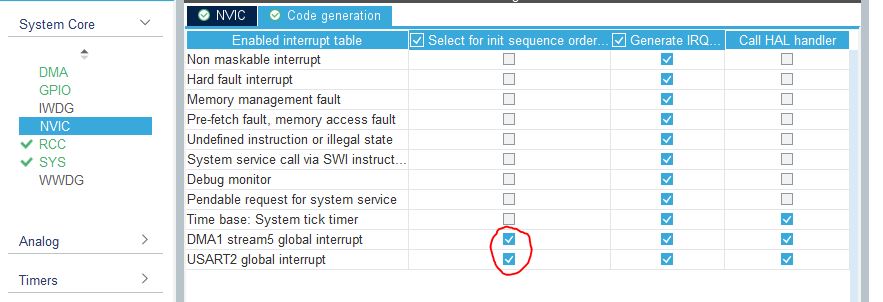
Finally, move enabling interrupts to after all peripheral initializations. It’s not necessary, but it improves code readability and sometimes behavior. I follow the rule that peripheral initialization always comes first, and only later do I think about enabling interrupts.
We have everything we need. Let’s move on to the code.
How to use DMA with the UART IDLE interrupt
There’s nothing left to do but simply use DMA and IDLE to receive some message. Let’s do it.
HAL makes reception as easy as possible. We need an array into which we will receive characters. I usually create it in the global variables area in the appropriate place in main.c marked by comments.
/* USER CODE BEGIN PV */
uint8_t ReceiveBuffer[32]; // Receive from UART Buffer
/* USER CODE END PV */
Now we need to set reception via DMA. The function HAL_UART_Receive_DMA(…) handles receiving using DMA, however it won’t help us here. It sets a fixed number of characters to receive and that’s it. We need to additionally enable the IDLE interrupt.
That’s why we have to use a completely different function. It has the “Ex” suffix, i.e. extended functions from the HAL API. It will be HAL_UARTEx_ReceiveToIdle_DMA(…), which takes exactly the same arguments as the regular DMA reception function.
So let’s use this special function in main, right before starting the main loop. The right place for this is user section number 2.
/* USER CODE BEGIN 2 */

// Start to listening on UART with DMA + Idle interrupt detection
// the Callback is in USER CODE 4 section
HAL_UARTEx_ReceiveToIdle_DMA(&huart2, ReceiveBuffer, 32);
/* USER CODE END 2 */
Remember that we’re setting up “listening” and we don’t need to wait for reception to finish. We’ll get an interrupt in due time. Right – an interrupt. In HAL, we remember that interrupt handling is done by the library. We are given callbacks to react to the appropriate interrupts.
For UART reception on DMA using the IDLE interrupt there is one common callback – HAL_UARTEx_RxEventCallback(…). In it we of course get information about which UART invoked the callback, but not only that. In the second argument we get the number of bytes that managed to be received on the UART.
This is incredibly valuable information, because the interrupt could occur after a different number of characters! That’s exactly why we use IDLE. With that information we have everything we need for parsing.
How to write our callback handler? Just check if it was our UART that triggered it, then do your work. For example parsing or putting it into some buffer (e.g. circular) for later processing outside the interrupt.
At the very end you must re-enable listening. In the same way as in main. You must set up DMA and UART reception with IDLE again from scratch. The whole callback will therefore look like this.
/* USER CODE BEGIN 4 */
void HAL_UARTEx_RxEventCallback(UART_HandleTypeDef *huart, uint16_t Size)
{
    // Check if UART2 trigger the Callback
    if(huart->Instance == USART2)
    {
        //
        // Do something
        //

        // Start to listening again - IMPORTANT!
        HAL_UARTEx_ReceiveToIdle_DMA(&huart2, ReceiveBuffer, 32);
    }
}
/* USER CODE END 4 */
And that’s it. Let’s check if it works.
Reception behavior
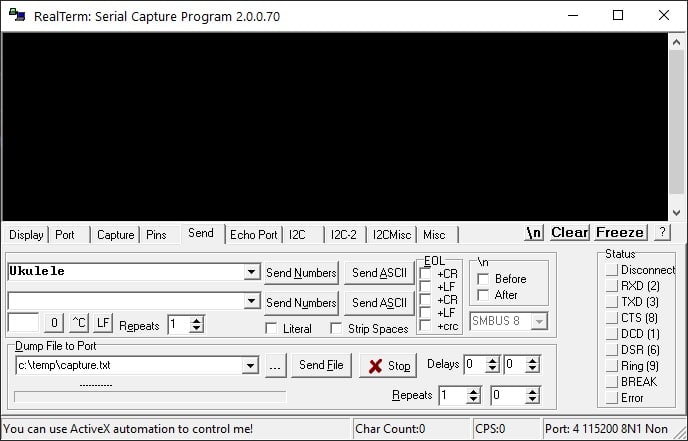
We have 32 bytes set to be received via DMA. Let’s send fewer. For example the string “Ukulele”. It has definitely fewer characters than the amount planned for DMA. In that case we should get a UART IDLE interrupt.
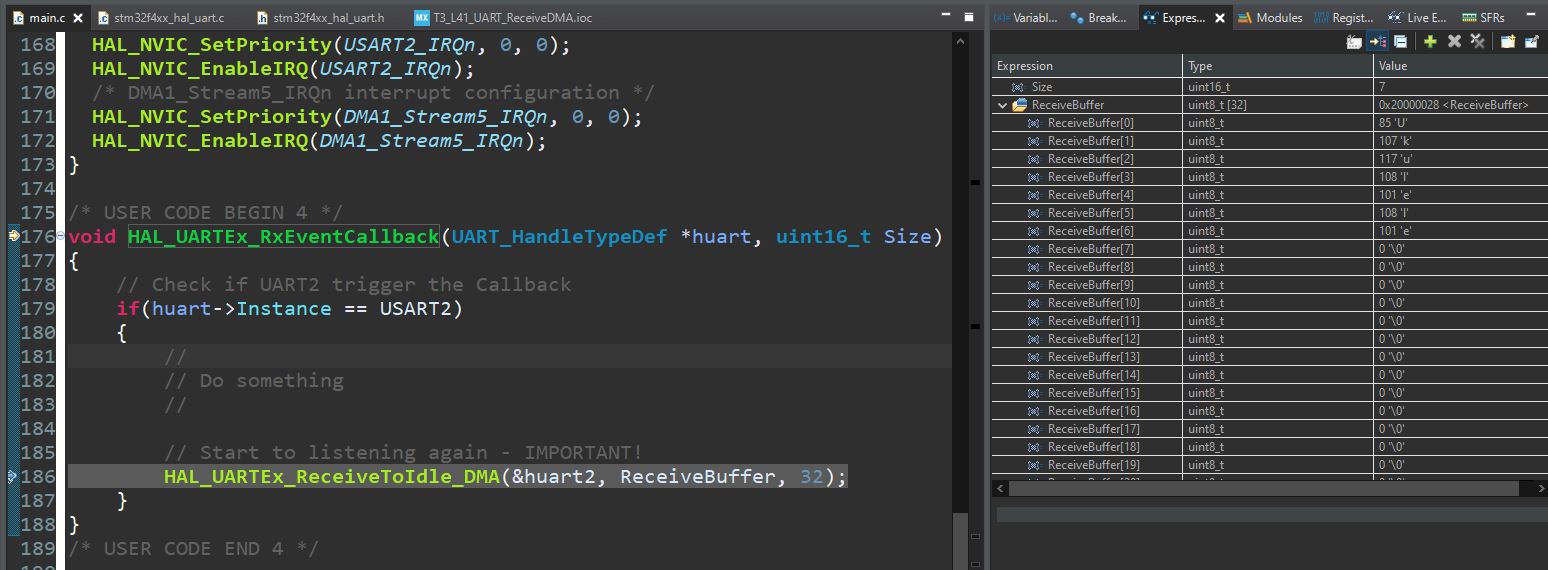
I set a trap in our callback, ran the program, and sent the text.
And… voilà! The program stopped at the breakpoint. On the right side I put into Live Expression what interests us: the size of the received string – 7 bytes. That’s what the callback passes to us and it should be used later.
I also added the array itself that I wanted to receive into on UART, and my Ukulele is there 🙂
It works as it should!
Parsing strings
Next, we should parse what we received, i.e. react to what came in. This is a much more complex operation and can be divided into simple and complex parsing.
I covered the topic of receiving and parsing UART strings in great detail in my STM32 Course for Beginners (the course content is conducted in Polish).
Registration for the third edition is now open. The course covers a very broad range of STM32 programming. You learn not only the microcontroller itself, but also various programming techniques and how to handle embedded challenges. For example, receiving characters on UART, buffering them in a circular buffer, and later processing strings.
Check the full curriculum at https://kursstm32.pl/ (the course content is conducted in Polish). You can join the third edition until Friday 04.06.2021 until 20:00. After that, it will not be possible to join the course!
Summary
We finally got support for UART with DMA and the IDLE interrupt. ST implemented it in such a way that using this reception method is ridiculously simple.
The only thing you need to do is set up DMA and UART interrupts, and use the reception start function and the callback.
This method is the same for all STM32 families, so go ahead and try it on your microcontroller!
If you noticed any mistake, disagree with something, would like to add something important, or simply feel like discussing this topic, write a comment. Remember that the discussion should be polite and in accordance with the rules of the Polish language.
Podobne artykuły
The Most Popular IDEs for STM32 in 2022
My Finger Is Pulsing!!! The MAX30102 Pulse Oximeter Under STM32 Control.
Measuring Air Quality with the SDS011
Darmowy ebook
Dołącz do mojej listy mailowej aby otrzymać darmowy ebook "Pierwsze kroki z STM32".
Udało się!
Potwierdź w emailu dołączenie do mojego newslettera!
In mid-July 2025, together with several leading creators from the embedded industry, we had the opportunity to visit the STMicroelectronics factory in Agrate, Italy. How did it happen? …well, I know 😅 This visit had Read more
UART Communication on STM32. Transmission to PC | STM32 on Registers #6 We have already learned the basic operations on GPIO, as well as ways to delay individual tasks. Today we will go beyond the Read more
Doing 3 Things at Once, or How to Implement a Software Timer? | STM32 on Registers #5 Let’s get to know one of the effective ways not to block the processor’s work by waiting. It Read more
The msalamon.pl blog uses cookies. By using the website, you consent to the use of cookies. More information can be found on the Privacy Policy page. Do not acceptAccept
Privacy Policy & Cookies
Privacy Overview
This website uses cookies to improve your experience while you navigate through the website. Out of these cookies, the cookies that are categorized as necessary are stored on your browser as they are essential for the working of basic functionalities of the website. We also use third-party cookies that help us analyze and understand how you use this website. These cookies will be stored in your browser only with your consent. You also have the option to opt-out of these cookies. But opting out of some of these cookies may have an effect on your browsing experience.





0 Comments