Have you ever seen on some forum or social media group how “high-ranking” programmers forbid using float? Have you noticed that none of them explains why? Just because! That’s it. Why is using float for some people as bad as killing small animals? Let’s find out!
In this post, I will base it on ST’s documentation
AN4044 – Floating point unit demonstration on STM32 microcontrollers.pdf
. For some, this document may be incomprehensible, so let me shed some light on floats for STM32 and beyond.

Float representation
First, it’s worth saying how floating-point numbers are stored by the MCU. As we all know, a bit has only two states and you can’t insert any fractional number between 10 and 11. So how does it work? There is the IEEE 754 arithmetic standard that defines the encoding and basic operations on floats. The most commonly used floating-point numbers are single and double precision – single and double. Their encoding looks like this:
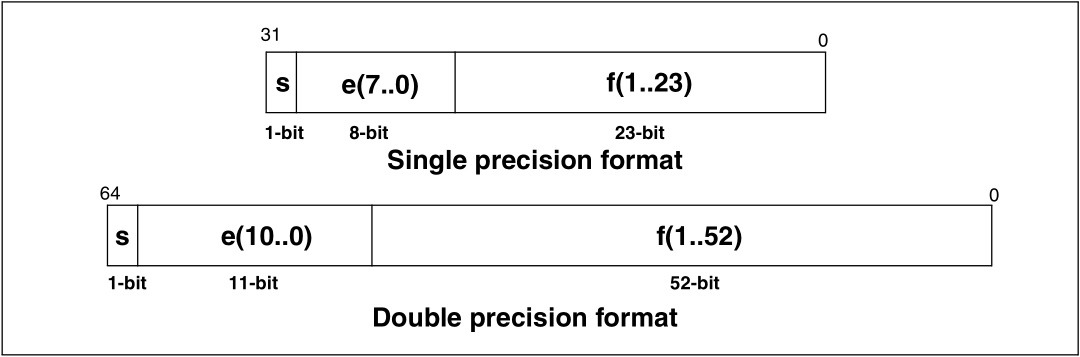
What does this mean?
s – the sign bit. It decides whether the number is positive or negative. 0 – positive, 1 – negative.
e – 8- or 11-bit exponent. The integer to which we raise the base of the number system – in our case the number 2 because we encode in binary. You must add the so-called bias to the exponent, equal to 127 for single and 1023 for double.
f – 23- or 52-bit mantissa. The number from which we obtain the fraction. It’s a normalized number, more on that in a moment.
The formula for a floating-point number therefore looks as follows:

Looks complicated, right? Let’s try to convert some fraction to the float representation. Let it be the number 243.45.
First, we should handle the integer 243, which is quite simple. The result is 11110011. It’s worse with the manual conversion of 0.45. I recommend watching a video that explains how to do it (link). 0.45 in binary representation is 011100(1100…).
So 243.45 = 11110011.011100(1100…)
Now we need to normalize this number. A normalized number is one that lies in the right-open interval [1, B) where B is the base of the number’s encoding. In our case, the encoding is binary, so the point must be after the first one. Count how many places you shifted the point. This is needed for encoding the exponent.
After normalization, our number is 1.110011011100(1100…) x 10^7.
Thanks to the fact that the integer part is always 1, there is no need to store it. In the float number, only the fractional part is stored and this is the mantissa shortened to 23 or 52 bits.
f = 11001101110011001100110
Now the exponent. I shifted the point 7 places to the left, so it is 7. Adding the bias for the 32-bit representation gives 134, which in binary is 10000110.
e = 10000110
The number is positive, so the sign is zero
s = 0
Now we can assemble our float.
243.45 (dec) = 0 10000110 11001101110011001100110 (float)
Simple, isn’t it? 🙂
Operations on floating point
The IEEE 754 standard also defines floating-point arithmetic. It contains 6 operations on numbers:
- Addition
- Subtraction
- Multiplication
- Division
- Remainder (modulo)
- Square root
Let’s try something easy, e.g., let’s add 188.1 and 182.69. In your head you can quickly compute that it will be 370.79, but will float give the same result?
188.1
188 in binary is 10111100 while 0.1 is equivalent to 0(0011…). Do you see the small danger related to the infinite expansion? If not, don’t worry, it will be visible. Combining the two components, I get 10111100.0001100110011(0011) and adapting it to the float standard 1.01111000001100110011001|10011 x 10^7. What’s after the vertical bar is redundant for float32 and is lost forever. We have the first loss of information. The exponent is 7, so after adding the bias we get 134.
188.1(dec) = 0 10000110 01111000001100110011001(float)
Now 182.69
182 = 10110110.10110000101000111101 = 1.01101101011000010100011|1101 x 10^7
Again, we lose information about the fractional expansion. Converting to the IEEE 754 representation:
182.69(dec) = 0 100000110 01101101011000010100011(float)
The first thing to do when adding floating-point numbers is to equalize their exponents. In my example we have the same exponents, so we don’t need to do this operation. The next step is to add the mantissas, keeping in mind the one before the point, which is not in the float encoding. I will skip the manual binary addition process for readability
1.01111000001100110011001 x 10^7 + 1.01101101011000010100011 10^7 = 10.11100101100101000111100 x 10^7
The result must be normalized: 1.01110010110010100011110|0 x 10^8
In float encoding our result looks like this: 0 100000111 01110010110010100011110
We should decode this result. It will be easiest for me to extract it from the normalized result, of course truncated to the size of the float standard because that’s what we actually extract the operation result from.
1.01110010110010100011110 x 10^8 = 101110010.110010100011110
I split this into an integer and fractional part:
101110010 = 370 – success. Now the fraction. You can find the method of converting a binary fraction to decimal form at this link.
0.110010100011110 = 0.78997802734375
So? It’s a bit less than 0.79. And here lies one of the dangers associated with float. With a small number of operations and low precision requirements, e.g., one or two decimal places, it doesn’t matter that much, but imagine when an MCU performs hundreds or thousands of such operations and each introduces such a small error.
For this reason remember: never use the == and != operators to compare floating-point numbers. Use some small delta, or epsilon (people call it differently). For example: if( abs((expected – result)) <= 0.01 )…
Why is that?
Precision
The result of addition in the example above is a consequence of the precision of numbers stored in a float variable. Do you think you can store all fractions with them? Well, no. I prepared in Octave a plot with marked floats for an 8-bit mantissa and an exponent from -5 to 5.
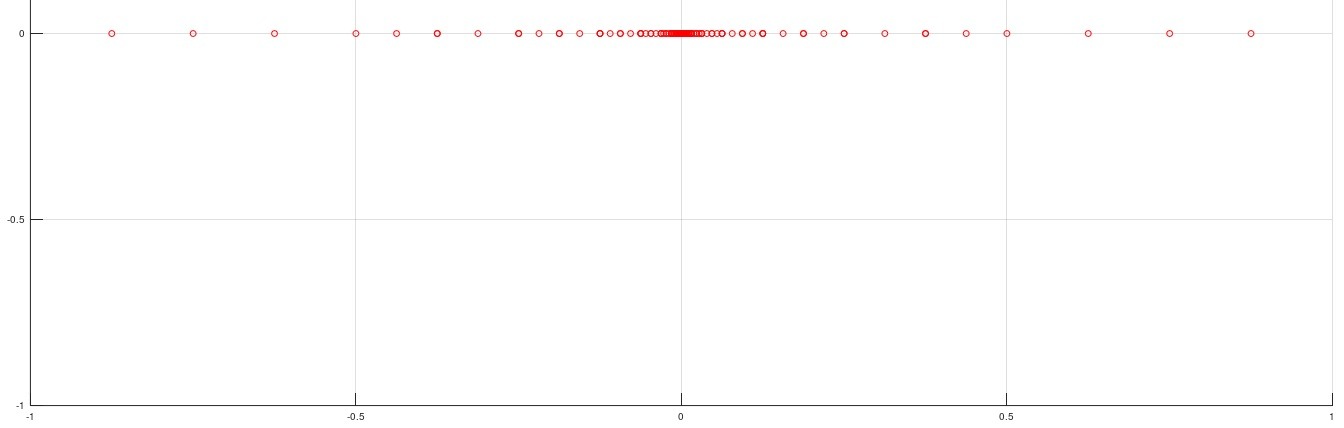
Each circle represents one number. What stands out? What about all the numbers between 0.5 and 1? According to these parameters there are only 4 of them. The rest don’t exist. Of course, with a mantissa and exponent consistent with the IEEE 754 standard there will be more of them, but it still won’t cover all possible numbers.
Also notice that the further from zero, the sparser the points. Do you guess what that means? Operations on large numbers produce even greater errors resulting from these limitations.
Computational complexity and FPU
Adding floats seems quite simple, but it includes several operations such as extracting the exponents, equalizing them, adding the mantissas, and transforming the result back into IEEE 754 form. It’s similar for subtraction, multiplication, and the rest of the operations. Compared to integer (binary) arithmetic, a considerable processor overhead is required. In other words, performing a single operation on floating-point numbers requires the MCU to perform dozens of operations, which are carried out using ordinary binary operations.
Some microcontrollers are equipped with an additional unit dedicated to floating-point computations. This is the FPU – Floating Point Unit. This unit is included, among others, in MCUs from the F4 family based on the Cortex-M4 and Cortex-M7 cores, i.e., STM32 series F4, L4, F7, H7. This unit literally does miracles with floats. ST in its microcontrollers offers, with its help, several hardware operations on single-precision floats:
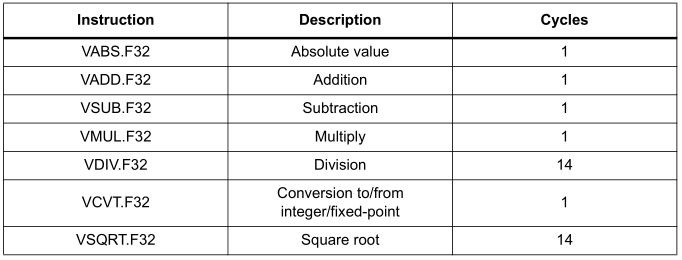
As you can see, absolute value, addition, subtraction, or multiplication are performed in just one clock cycle. All those operations I did by hand, the FPU does with a snap of a digital finger. Division or square root takes only 14 cycles. Additionally, we can see in the table that type conversions take only one cycle. Magic? Kind of 🙂
So how much does it take then?
They promised so much, so now let’s check the most important operations using simulation in the Keil µVision 5 IDE on an STM32F401RE, which I have on one of my Nucleo boards. The HAL library I’ll use is version 1.21. In the project settings I enabled the simulator and set no optimization. In the code, right after initializing HAL and clocks, I disable SysTick so it does not interfere with the computations. In the main loop I wrote simple code that performs basic operations on numbers. First I’ll test operations on uint32_t, then float with FPU disabled and enabled, and finally I’ll compare them. After each for I set a breakpoint and check the clock cycle counter in the simulation. For better visualization I perform each operation 100 times. Unfortunately there will be some additional cycles due to the for loops, but for each option it will be the same amount, so it won’t significantly affect the proportional result. FPU is enabled/disabled in the project settings. In Eclipse (or SW4STM32) this will be under Project > Properties > C/C++ Build > Settings > MCU Settings in the dropdown named Floating point hardware.
uint32_t a = 6754;
uint32_t b = 1267;
uint32_t result;

//float a_f = 12.67;
//float b_f = 6.754;
//float result_f;

while (1)
{
	uint16_t i;
	// Add
	for(i=0; i<100; i++)
	{
		result = a+b;
		//result_f = a_f+b_f;
	}

	// Substract
	for(i=0; i<100; i++)
	{
		result = a-b;
		//result_f = a_f-b_f;
	}

	// Multiply
	for(i=0; i<100; i++)
	{
		result = a*b;
		//result_f = a_f*b_f;
	}

	// Divide
	for(i=0; i<100; i++)
	{
		result = a/b;
		//result_f = a_f/b_f;
	}

	// Modulo
	for(i=0; i<100; i++)
	{
		result = a%b;
		//result_f = fmod(a_f,b_f);
	}

	// Square root
	for(i=0; i<100; i++)
	{
		result = sqrt(a);
		//result_f = sqrtf(a_f);
	}

	//int to float
	for(i=0; i<100; i++)
	{
		result_f = (float)a;
	}

	//float to int
	for(i=0; i<100; i++)
	{
		result = (uint32_t)a_f;
	}

	result = result+1; // delete warning
	result_f = result_f+1; // delete warning
	/* USER CODE END WHILE */

	/* USER CODE BEGIN 3 */
}
Are you curious about the results? They’re interesting.
First up is the size of the resulting code.
| Variable type | Size in bytes |
|---|---|
| uint32_t | 3594 |
| float without FPU | 5032 |
| float with FPU | 4684 |
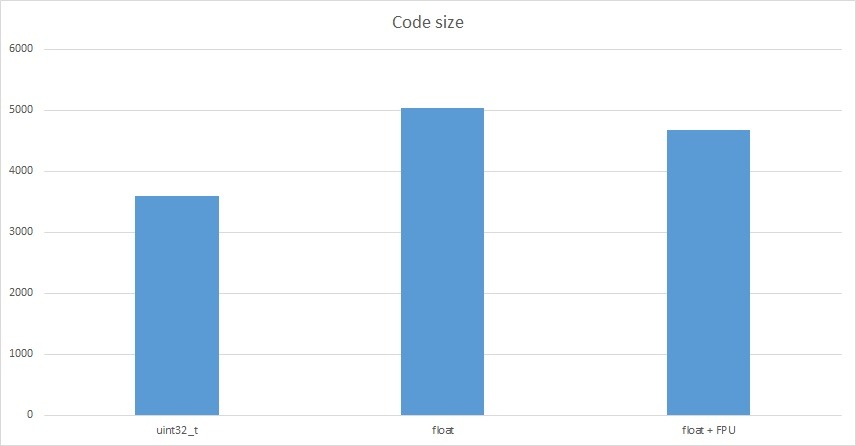
The amount of additional code resulting from operations on float increases by just under 1.5 kB. Is that a lot? For small AVR microcontrollers, definitely yes. STM32s have quite a lot of Flash memory and I believe this is not a big problem.
Now the most interesting part: operations on numbers. The numbers in the table are the number of clock cycles needed to perform each operation one hundred times.
| Variable type | + | – | * | / | % | sqrt |
|---|---|---|---|---|---|---|
| uint32_t | 706 | 706 | 706 | 1106 | 1306 | 211806 |
| float without FPU | 6706 | 9706 | 6306 | 27906 | 47106 | 204306 |
| float + FPU | 806 | 806 | 806 | 2106 | 55306 | 4806 |
Interesting, isn’t it? A combined chart is very unreadable due to the huge values for square root, so I’ll split the results.
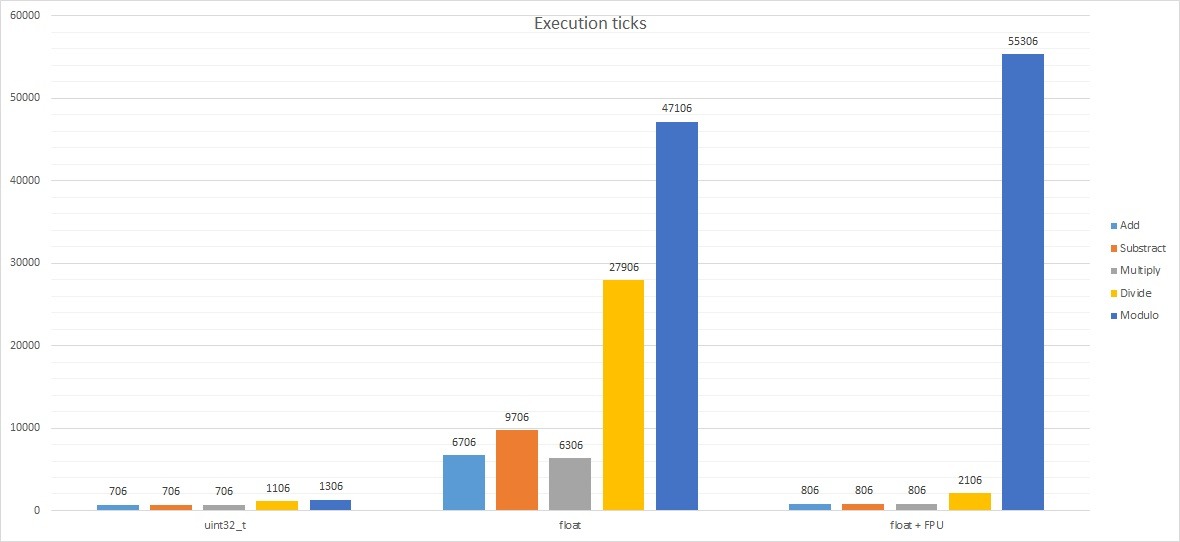
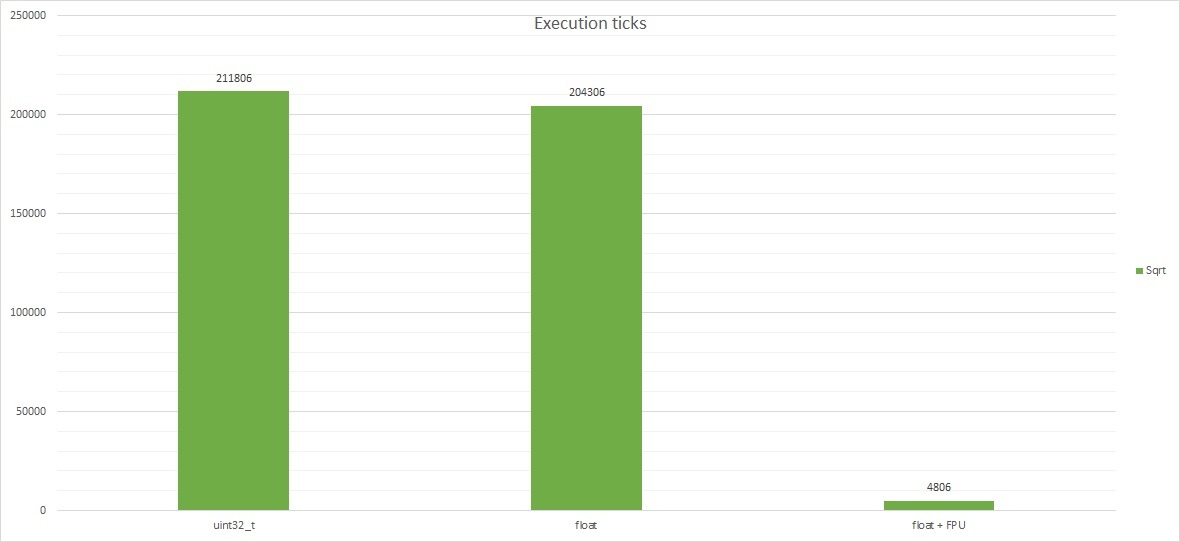
Do you see now why many people on forums get upset when someone uses floats unnecessarily? For now, let’s compare the results of uint32_t vs float without FPU. Not every microcontroller has an FPU. All the more so popular Arduino, where ready-made libraries push float wherever possible. The computation time for float is slower than for uint32_t by:
- ~9.5 times for addition
- ~13.75 times for subtraction
- ~8.93 times for multiplication
- ~25.23 times for division!
- ~36 times for modulo!
Interestingly, calculating the square root takes a similar number of clock cycles. I dug a bit into the M4 core documentation. It doesn’t have an instruction for binary square root, hence probably such overhead. The library must handle it using basic operations for both uint32_t and float. Now look at square root using the FPU. Impressive, isn’t it? The floating-point unit already has instructions dedicated to this operation. It can perform it lightning fast (~42 times faster) compared to uint32_t and float without FPU.
What did enabling the FPU give?
The number of CPU cycles needed for float calculations almost equalized with those for uint32_t. The exception is the modulo operation. This is for a simple reason. The FPU doesn’t support modulo division, hence the library requires computational overhead using other operations such as addition, subtraction, multiplication, and division. Here we won’t gain anything and, as the chart shows – we will even lose. I can’t explain why float modulo with FPU enabled needed even more clock cycles than software-only support. I didn’t delve into the CMSIS libraries and CPU instructions. Maybe one of the readers has more knowledge in this area and will share it in the comments?
There’s also type conversion left.
| Operation type | Without FPU | FPU |
|---|---|---|
| uint32_t to float | 4606 | 1006 |
| float to uint32_t | 2706 | 906 |
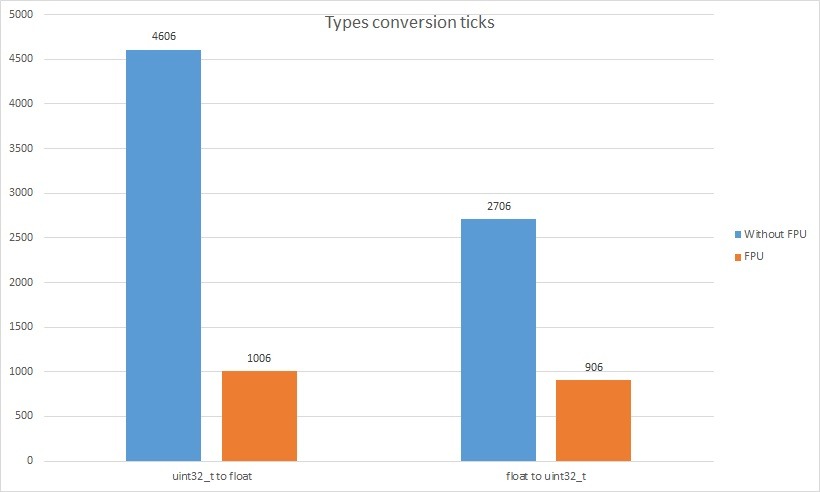
The gain from using the FPU for type conversions is indisputable and I think it needs no comment. For square root, it pays to convert ints to float, compute, and convert back. One should check whether the precision of the float representation will be sufficient for the application.
How to live?
When writing programs, it’s better to consider whether floating-point numbers are indispensable. A common statement is that “it doesn’t matter here” when a small program by a beginner is being discussed. The discussion sometimes grows to the size of “PC vs console”. My opinion is that wherever possible, float should be avoided. You never know when, writing a bulky float-based library, you’ll want to call these operations hundreds of times per second. Then the MCU may choke. Of course, there are applications where floating-point numbers are indispensable and you should be aware of frequent float usage.
You can often manage differently than with float. Example: a /= 2.55 will be equivalent to a = (a * 100)/255 performed on uints. Sometimes you have to do it on ints not 8-bit but 16, 32 or even 64. It will still be much faster and the MCU will reward you with speed. Unless we’re dealing with numbers so large that the 64-bit range is too small.
I would avoid modulo division on floats. Fortunately, it’s rarely used. I myself have never used this type of operation. Can anyone give a practical use case?
You can, however, gain on square roots with floats once the FPU is enabled. Type conversion then takes one cycle, and square root a dozen or so. This will be decidedly faster than computing the square root with library code on uints.
And what is your opinion?
Summary
I hope you now understand at least a bit why using floats on microcontrollers evokes so many emotions. The topic is interesting and I hope I’ve inspired you to read more, e.g., about float division, overflow or underflow, or other floating-point pitfalls. If you’d like to learn more, I recommend for example the presentation Pułapki liczb zmiennoprzecinkowych where the author described more topics related to floats. There are many great publications on the Internet on this topic.
Thank you for reading this post. If you like this kind of content, let me know in the comments. I will also be grateful for topic suggestions you would like me to cover.
If you noticed any mistake, disagree with something, would like to add something important, or just feel like discussing this topic, write a comment. Remember that the discussion should be polite and in accordance with the rules of the Polish language.
Podobne artykuły







0 Comments