New HAL2, new CubeMX2, new IDE. ST draws a line between the old and the new world
In the last article we looked at the STM32C5 family itself. There the hardware was what mattered most: a new Cortex-M33 in a low-cost family, sensibly arranged memory tiers, FDCAN practically everywhere and Ethernet in the top variant. But even then it was clear that C5 doesn’t end at the microcontroller. Together with this family, ST is also introducing the new HAL2 and the new CubeMX2, which really means it is starting a bigger change across its whole ecosystem.
And this is where the more interesting part begins. At first glance CubeMX2 and HAL2 look like just the next versions of tools we already know well. Only this isn’t about version numbers. ST didn’t simply release a “new CubeMX”, it clearly split its world into two tracks. The STM32CubeMX page shows this quite plainly: ST itself now describes the tool as a family covering STM32CubeMX and STM32CubeMX2. So we’re not looking at a simple update of the old program, but at the beginning of a new one
And that’s exactly why STM32C5 matters so much here. It’s not just another letter in ST’s portfolio, but the first family on the new side of the border. Older chips stay with HAL1 and the old CubeMX, and from C5 onwards a new track begins: CubeMX2, HAL2 and a whole new workflow around them. Importantly, ST talks about the IDE in a similar way – next to the classic STM32CubeIDE it already presents STM32CubeIDE for VS Code as a second variant of the environment. So the change isn’t about one program, but about the whole ecosystem and the way you work with it.
This article won’t be a screen-by-screen walk through the new CubeMX2 yet. We’ll do that separately, because it would be a shame to cram it in here. Here I first want to answer a more important question: what is ST actually changing, why is it doing it, and does this direction make sense from the perspective of someone who really builds projects on STM32. Because once you dig deeper, you quickly see that it’s not just about a new look for a tool, but about rebuilding the whole workflow – from configuration, through project generation, all the way to the IDE.
The article in video form (in Polish) 👇
C5 as the border between the old and the new world
In the previous article STM32C5 looked above all like a new, sensibly arranged microcontroller family. And of course that doesn’t change. We still have interesting hardware, a new core and a family that aims to be a kind of new “default choice” for many projects. But the longer I look at it, the clearer it becomes that C5 itself is a bit of a pretext for something bigger. Because in reality ST used this launch as the moment to draw a thick line between the old and the new world.
And that’s the key point: STM32C5 isn’t just a new family. It’s the border point of the whole ecosystem. Older families stay with HAL1 and the old CubeMX, and from C5 onwards a new track begins: CubeMX2, HAL2 and the rest of the tools around them. ST itself now presents STM32CubeMX as a tool covering two versions: STM32CubeMX and STM32CubeMX2. That doesn’t look like the classic “version 6, version 7, version 8”, but more like a deliberate split into two development paths.
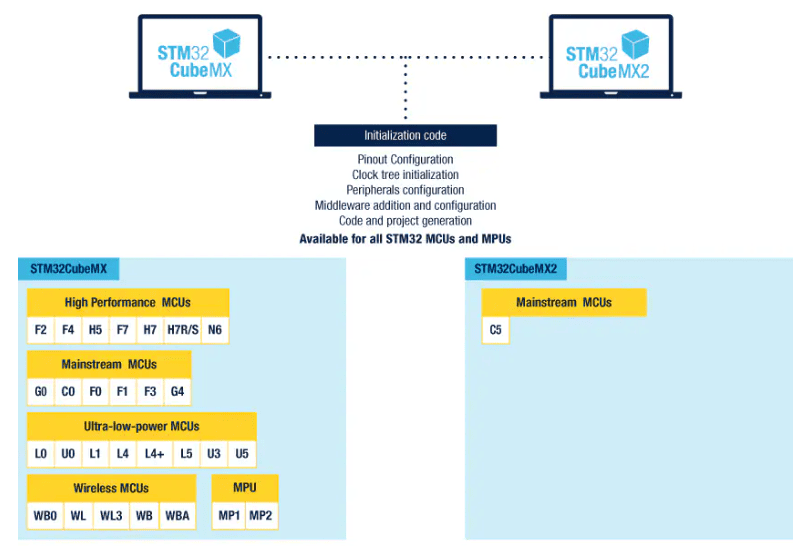
On paper a move like this can look a bit brutal. The natural question is: why not make one CubeMX, one HAL and just keep developing them? But that’s exactly where it gets interesting. Over the years HAL1 grew into a big, somewhat historical beast, where new things had to be bolted onto old assumptions. You could live with it, sure. But there was also more and more baggage that had to be carried forward. And I get the impression that ST finally decided it would be easier to draw a clear line than to pretend everything can still fit neatly into one bag.
From a practical point of view it even makes sense. Better an honest cut like this than a situation where for several years we have three semi-compatible variants of the same tool, four levels of backward compatibility and no idea which family is already “new” and which is still “old”. Here the rule is simple: whatever came out earlier stays the old way. Whatever comes out from C5 upwards goes down the new path. No mixing, and no pretending that everything will work the same everywhere.
Of course, that doesn’t mean the whole thing is suddenly simpler for the user. Quite the opposite – for a while we’ll be living in two worlds at once. Probably for quite a long while. A project on an older family will sit on HAL1 and the old CubeMX, while a new project on C5 or later families will go through CubeMX2 and HAL2. But all things considered, I prefer a clear split like this to never-ending adapters. At least you know where the old ends and the new begins.
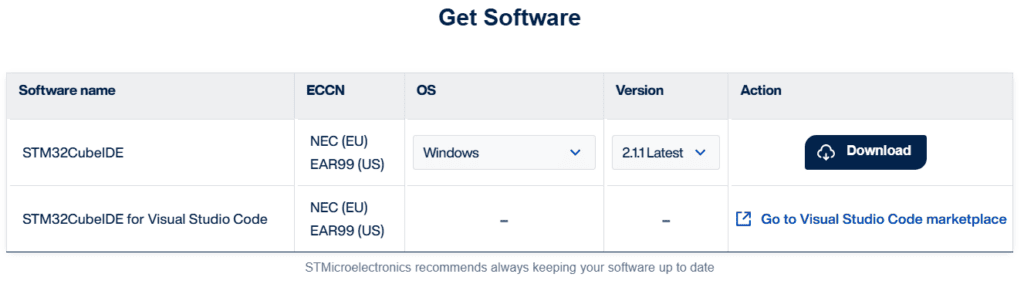
If CubeMX2 were just a refreshed interface for the old generator, there probably wouldn’t be much to write about beyond a few screenshots and a list of new features. But here ST isn’t changing just one tool. It’s rebuilding the whole workflow. CubeMX2 is one piece, HAL2 is another, and on top of that comes a new IDE based on Visual Studio Code. The STM32CubeIDE page itself now says outright that there are two variants of the environment: the classic STM32CubeIDE and STM32CubeIDE for VS Code, and ST states that it is now focusing more on the VS Code-based variant. That shows the scale of this change well.
CubeMX2 – the new look is the least important change
When you first launch CubeMX2, what catches your eye most is of course the interface. That’s natural, because after years of clicking around the old CubeMX you immediately look for the same places, the same tabs and the same habits. At first glance you can’t see that this isn’t just a repaint of the old tool. ST itself describes STM32CubeMX2 not only as a pin and clock configurator, but also as a tool for creating projects, managing drivers, middleware, packs and previewing code before generation. The documentation explicitly mentions features such as project creation, parts drivers management, pack management and code preview. That matters, because it shows that CubeMX2 is meant to be more than just the window where you click on a UART and then hit “Generate”.
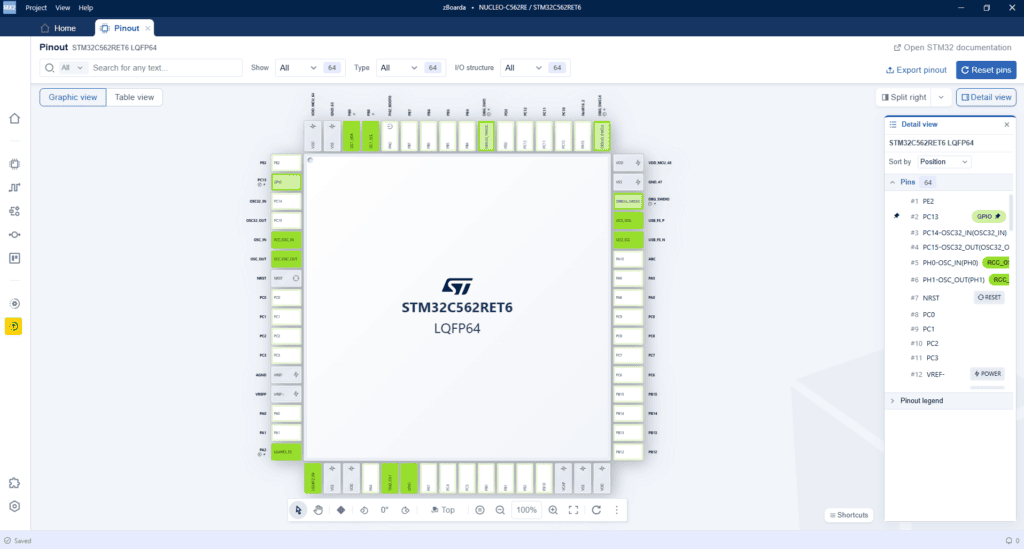
And here’s the catch: the biggest change isn’t in the colours, the icons or the panel layout. The most important thing is how ST wants this tool to be used. In the old CubeMX the workflow was fairly simple and fairly brutal at the same time: you configure, generate the project, go back, fix things, generate again.
CubeMX2 starts to move away from that model. We have a new feature called code preview, which shows that ST is trying to shift the centre of gravity from “generate the whole project” to “first see what this tool actually wants to do to your code”. Officially, ST describes the preview as a way to see the generated code before generating the project and to copy code snippets into your own project. That’s a change of approach, not just another feature to tick off in a table.
On paper it looks sensible. Very sensible, even. Because if CubeMX2 really lets you preview the result of a configuration and pull out only what you need, that’s a step towards less magic and more control. But it’s worth cooling the enthusiasm a bit right away. Because the question is: will it actually be useful? I’ve done a few live sessions with you and the new CubeMX2, and we still haven’t used it.
Besides, my first impressions are available in the live recording. You can see plenty of fresh ideas and a few things that look more modern than before. But at the same time, not everything is intuitive straight away. There are places where you have to readjust, places where the new layout takes a moment to get used to, and also moments where you think: OK, it looks nicer, but am I really working faster here? One example is being forced to expand every available configuration option, instead of having them expanded by default. In the old CubeMX we had everything in a table – now it’s drop-down lists.
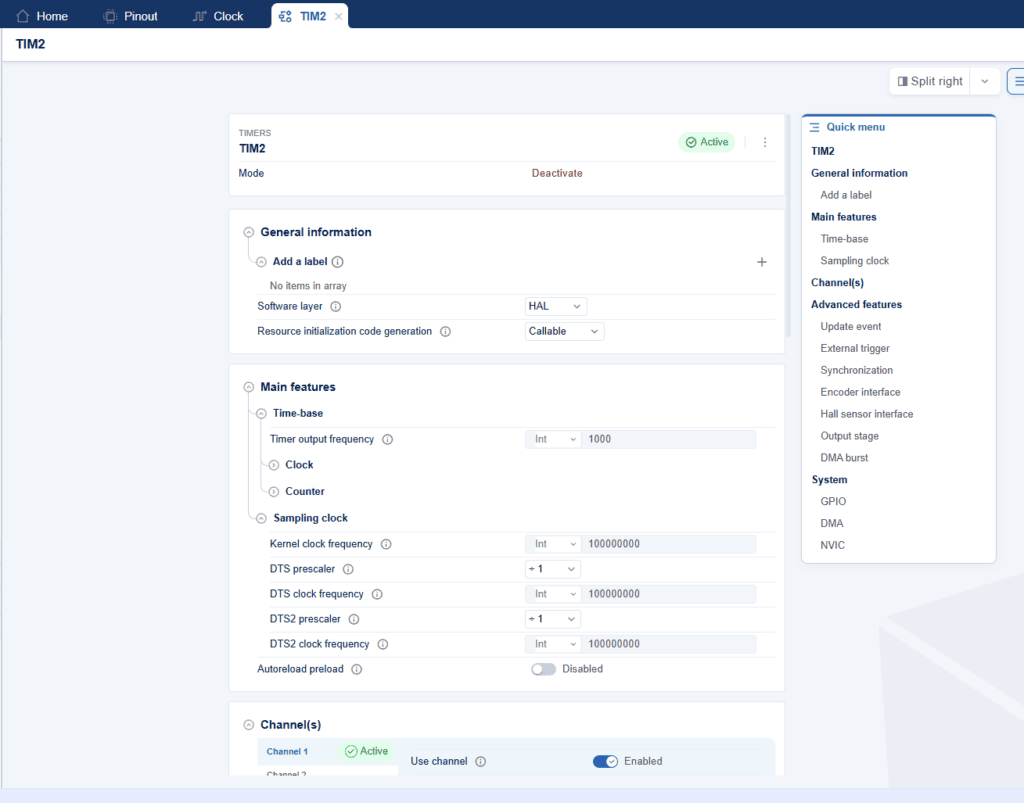
And that’s exactly why I don’t want to do a screen-by-screen walkthrough here yet. That will get its own article. Here it’s more important to notice one thing: CubeMX2 doesn’t look like a refreshed old generator, but like the start of a new model of working with a project.
CubeMX2 also changes how projects are generated
If CubeMX2 stopped at a new interface and code preview, it would still be some kind of change. But there’s one more thing, much more important from the point of view of everyday work: how the project is generated. And here you can already see that ST isn’t just trying to refresh the old project generator, but is really rebuilding the workflow. The CubeMX2 quick start documentation and the STM32C5 materials state outright that when generating a project you choose the IDE format, and for new C5 projects CMake very clearly appears as the target project format. ST shows it alongside other formats such as Open-CMSIS or IAR, but it’s CMake that fits the new workflow best.
Of course, these things were already showing up in the standalone version of the old CubeMX, but here it comes through even more strongly.
And it’s a change you can’t brush off in one sentence. CMake itself isn’t magic or a guarantee of happiness. You can still make a project that looks modern but is a pain in practice. But the very fact that ST is starting to generate projects this way is a very clear signal. It means they’re no longer thinking only in terms of “generate a folder for our specific IDE”, and are moving towards a more flexible model: configuration separate, build system separate, editor or IDE separate.
This ties in nicely with the whole new ecosystem, because if CubeMX2 generates a CMake project, it’s much easier to connect it to different environments, automation or CI later. ST itself is already publishing separate materials on integrating CMake with CubeMX and using it in STM32CubeIDE for VS Code, so this doesn’t look like a random add-on, but like a direction they’re really pushing forward.
On paper it looks good. Very good, even. Because for years the STM32 workflow was tightly tied to what Cube generated and which IDE it then pushed it to. The default environment for working with STM32 was the Eclipse-based STM32CubeIDE. I like it and I still think it does a good job for many things. But there’s no point pretending it’s a fresh approach to development. It’s a tool built around an older way of working: tightly integrated, fairly heavy and less flexible when you want to hook it up properly to modern tools. And this isn’t only about CI or your own build system, but also about things that are simply part of everyday work today, such as LLMs that help with writing and analysing code. In that world, a more modular workflow, with a project generated for CMake and a VS Code-based environment, stops being a whim. It’s simply a response to how the market really works today.
And that’s exactly why ST’s move makes sense. CubeMX2 stops being just a project generator for one specific environment and starts to fit into a more flexible workflow. Only practice will show whether ST has made it truly convenient, but the direction itself is simply needed.
STM32CubeIDE for VS Code. ST moves into Visual Studio Code
If CubeMX2 and CMake project generation are one pillar of this change, the other is the new IDE. And there’s no beating around the bush here either: ST is clearly trying to step outside its current, fairly closed way of working. The STM32CubeIDE page now shows plainly that there are two variants of the environment. The first is the classic Eclipse-based STM32CubeIDE, around since 2019 and aimed more at people who like an integrated, GUI-driven environment centred on debugging. The second is STM32CubeIDE for VS Code, launched in 2025 and aimed at those who prefer better C/C++ editing, Copilot integration, more flexibility and smoother CI/CD workflows. And that alone says a lot about how ST sees the future of its toolchain.
Importantly, this doesn’t look like an attempt to build yet another heavy IDE from scratch, but rather like entering the Visual Studio Code world through a set of extensions, integrations and its own tools around it. The documentation for STM32CubeIDE for Visual Studio Code is maintained separately and covers not only installation, but also creating your first project, migrating between extension versions, building, debugging, integration with external tools and everything else that normally makes up a full workflow. That matters, because it shows ST doesn’t treat it as a side add-on, but as a fully fledged way of working. What’s more, the documentation explicitly describes STM32CubeIDE for VS Code projects as working with projects generated by STM32CubeMX, with Makefile or CMake, depending on the project settings.
And this is where the whole puzzle starts to fit together. CubeMX2 configures the project. CMake becomes the natural generation format. And STM32CubeIDE for VS Code provides an environment that fits much better with how teams really work today. Not because VS Code is trendy. But because this model is simply more flexible. It’s easier to connect it to your own repo, to CI, to other extensions, to code analysis tools and — which also matters today — to LLMs that assist with development. ST itself says as much, pointing precisely to Copilot, flexibility and CI/CD as arguments for the VS Code variant.
And here I can honestly say one thing: I’m not a VS Code master myself yet. I know it, I’ve used it, but I’m not someone who has been sitting in that environment from morning till night for years. So we’ll be learning it together a bit. And in my opinion that’s actually a good thing. Because instead of pretending I’ve already got this whole new workflow figured out inside and out, it’s better to approach it the way plenty of people working on STM32 today probably do: the classic CubeIDE is familiar and comfortable, but you can already see the world moving towards more modular, more flexible tools. And ST is simply starting to keep up with that.
Of course, that doesn’t mean everything is already perfect. ST itself thanks the community for its patience and feedback, stating plainly that the team is still developing the tools for VS Code. The community also mentions more advanced debugging features that are still missing, and things that are still being polished. So again: the direction looks good, but this whole workflow is still fresh and still maturing. And that’s exactly why I don’t want to describe it here as something fully finished yet. Rather as a very important change that’s simply worth watching and testing right now.
HAL2 – a change of philosophy
With CubeMX2 and the new IDE it’s easy to focus on the tools, because you can see them right away. But the most interesting change actually sits deeper, in the HAL itself. And this is where it’s very easy to get it wrong, because on slides or in short summaries HAL2 can look like “HAL, just a bit lighter, a bit faster and a bit more modern”. Well, not quite. The more I look into ST’s migration documentation, the clearer it is that they themselves don’t treat it as a simple facelift. The HAL1 → HAL2 guide has a separate section titled Breaking changes in concepts. That heading alone says a lot. This isn’t a message along the lines of “we’ve renamed a few functions”. It’s an open admission that some of the library’s fundamental assumptions are changing.
And you can see it in the list of topics ST lays out there. These aren’t minor fixes, but changes to the very assumptions of the library, including:
- optimised initialisation and configuration APIs,
- atomic configuration methods,
- more specialised clock and interrupt management,
- HAL2 built on the LL library,
- RTOS-aware HAL2,
- new coding rules,
- a general refactoring of the library.
and a few other things. So it’s not just the API, but the whole way of thinking about how HAL2 is meant to be built and how it’s meant to be used. ST itself presents this as a conceptual change, not a cosmetic one. That matters to me, because it confirms something you could already feel before: over the years the first HAL simply accumulated all sorts of historical decisions, compromises and patterns that could be maintained, but couldn’t necessarily be developed further without an ever-growing mess. So HAL2 looks more like an attempt to tidy things up from the inside than just slimming down a few drivers.
And this is where the new HAL2 gets really interesting. Because ST isn’t only talking about optimisations, it’s also trying to simplify the library’s structure, unify certain mechanisms and build everything more firmly on a more consistent foundation. The documentation states outright that HAL2 is built on LL services. On top of that come changes to the coding rules, a refactoring of the common
1 | stm32_hal.h |
And to be honest, that’s the most important signal from the whole of HAL2 for me. Not that flash usage dropped by some percentage somewhere, but that ST finally looks like it wants to really clean up the HAL, rather than just add another layer on top of the existing mess. Will it work out? That’s a separate question. But the direction itself looks sensible. And it’s also good that ST isn’t pretending nothing big is changing, but provides migration tools and documentation that says outright: yes, there are breaking changes here and you need to take them seriously.
The HAL2 API itself has changed too
When we started playing with HAL2 on the live streams, it quickly turned out that the API is familiar and a bit different at the same time. And that’s probably the best summary of the first contact. There’s no revolution along the lines of “we’re learning everything from scratch”, because the naming and the general style are still very much ST and well known to us. But it’s not the old HAL in new clothes either. Even with the simplest UART tests you could see that a few things work differently, a few are more extensive, and a few simply require a change in thinking.
The biggest change for me? They got rid of the
1 | extern |
1 | huart2 |
1 | htim3 |
1 | extern |
1 | <em>mx_usart2_uart_gethandle()</em> |
The changes were also visible in our joint live tests with UART. On the one hand, the basic functions look familiar. We still have plain transmitting, interrupt variants, callbacks and that whole familiar world. On the other hand, the API is clearly richer than before. In the official HAL2 UART documentation for STM32C5, ST shows not only classic TX/RX scenarios, but also receiving until idle, until timeout and until a specific character — in polling as well as in the IT and DMA variants. So where you often used to have to write something yourself or piece it together from several mechanisms, here you get more ready-made use cases. And that does look sensible.
The live streams also showed clearly that callbacks are getting more detailed. It’s no longer the simple model of “something finished and you only get the handle”. Some callbacks carry extra information, for example the transfer size or the event type. And that’s a change for the better, because there’s less you have to guess afterwards or reconstruct indirectly from context.
There was one more thing I really liked and that’s worth highlighting. In HAL2, DMA-related functions are no longer there “everywhere, just in case”. If you don’t enable DMA for a given direction, the corresponding parts of the API simply don’t appear in the generated project. And in my opinion that’s a change for the better. In the previous HAL some DMA functions were present practically always, even if DMA wasn’t actually configured in the project. That could be misleading, because you saw a function, used it, and only later found out there was nothing underneath to hook it up to anyway. Here the behaviour looks more honest: you didn’t configure DMA, so you don’t get an API that suggests DMA is ready to use. It’s a small detail, but it shows very well that HAL2 and CubeMX2 are trying to tie the generated code more closely to the actual project configuration, instead of leaving the user with half-truths.
So my first impression of the API itself is this: HAL2 is similar to HAL, but more extensive and more aware of specific use cases. In a few places it looks more sensible than before. In a few it takes getting used to. But the most important thing is that you can see a change of approach here, not just a change of the number in the library’s name.
HAL2 and LL. It’s starting to look consistent
One of the more important changes in HAL2 is a much tighter link with the LL layer. In the old ecosystem LL of course existed, but it often looked as if HAL and LL lived somewhat side by side. Here ST communicates it much more clearly. In the migration documentation, one of the main points among the conceptual changes is explicitly the HAL2 implementation based on the LL library. So this isn’t about randomly using a few low-level functions, but about a more deliberate architecture of the whole abstraction layer.
And that does look sensible. If the HAL is to be lighter, more predictable and less historical than before, it probably wouldn’t work without a tighter link to LL. Thanks to that, HAL2 stops looking like a separate, heavy beast and more like a sensible layer on top of the lower level. From a practical point of view this may mean less duplication, easier dropping down a level where it’s really needed, and more consistent code across the whole ecosystem. On paper it’s one of those changes that don’t make as big an impression as a new IDE or a new CubeMX2 look, but architecturally they can mean much more.
Where are the real benefits?
The easiest thing now would be to repeat ST’s slides about a smaller footprint, better architecture and a new workflow, blah blah blah. But from the point of view of someone who really works on projects, other things matter more. For me the biggest advantage of this new stack is that it finally starts to look consistent.
CubeMX2 is no longer just a clickable generator (although the number of clicks per second has gone up thanks to the drop-down lists). Projects are moving towards CMake, on top of that there’s STM32CubeIDE for VS Code, and HAL2 is trying to tidy up the abstraction layer from the inside.
These aren’t three random novelties thrown into one bag, but parts of a single direction. ST itself now presents CubeMX as a family covering STM32CubeMX and STM32CubeMX2, and CubeIDE as an environment also available in a for VS Code variant. That shows well that the change isn’t about one program, but about the whole workflow.
The second real advantage is more down to earth: less legacy, more explicitness. You can see it both in the API and in the project organisation. An end to some old habits such as reflexive
1 | externs |
And I see that as a positive, because it means they’re not trying to put lipstick on the old HAL, but have actually rebuilt it. Of course, only practice will show how much of it really turns out well. But the direction itself looks like something this ecosystem simply needed.
HAL1 → HAL2 migration? It exists, but…
It’s worth knowing that ST has already prepared a migration guide from HAL1 to HAL2 and added a HAL2 Migrator on top. At the time of writing, the practical documentation on using the tool itself is simply weak. In fact, it’s pretty much missing.
There’s a lot of material on differences, concepts and API mapping, but there’s still nothing that would let you say: OK, this is a polished, proven workflow you can safely repeat step by step.
Even ST’s Polish branch admits they haven’t played with it much yet themselves, because it’s not really clear how to approach it sensibly in practice. So for now I’d treat it more as a sign of the direction than a tool you can already recommend blindly.
And one more important clarification: this isn’t about older STM32 families suddenly being migrated to HAL2. The border is still hard. Older families stay on the old stack, and new ones move to the new one. This migration guide should rather be understood like this: if you have a project written on HAL1 and want to move it to a new family that already runs on HAL2, ST gives you some materials and tools for that. That makes sense, but for now we need to wait for the topic to mature – both on the documentation side and in terms of real experience from people who will be doing it on live projects.
Summary
At first glance you could boil all this down to a simple slogan: new HAL, new CubeMX, new IDE. But after a closer look it’s clear this isn’t about three separate novelties. ST is simply rebuilding its whole workflow around the new families, and STM32C5 is the first place where you can see it so clearly. On the one hand we have a hard border between the old and the new world. On the other – the new CubeMX2, projects generated for CMake, a new VS Code-based IDE and HAL2, which looks like an attempt to clean up things that piled up in HAL1 over the years. ST itself now presents CubeMX as a family covering STM32CubeMX and STM32CubeMX2, and CubeIDE as an environment also available in the STM32CubeIDE for VS Code variant.
And in my opinion this is a change for the better. Not because everything is already finished, polished and bug-free. Because it isn’t. But because this ecosystem simply needed a fresh start. The market moved long ago towards more flexible workflows, better integration with modern tools and more explicitness in code. ST’s old stack was usable, but you could increasingly feel it dragging a lot of historical baggage behind it. HAL2, CubeMX2 and the new CMake and VS Code-based workflow look like a sensible answer to that problem.
For now, the most honest thing to say is this: the direction looks good, but it’s still the beginning of the road. In a few places you can see very sensible decisions. In a few others you can still see freshness and immaturity. On top of that there’s the HAL1 → HAL2 migration, which formally already exists, but in practice is still more a preview of a future workflow than a ready, polished tool you can use straight away. Even the migration documentation itself shows that there are a lot of changes and that ST treats them as real breaking changes in concepts, not a simple facelift.
So my conclusion is this: it’s worth taking an interest in this right now, because this is the way ST will go with its next families. But at the same time there’s no point pretending everything is already settled and in order. This is the moment when it’s best to just jump in, have a look, test things and form your own opinion. And in the next article we’ll do a more technical walkthrough of CubeMX2 itself and its UX, because there’s plenty to talk about there too.
If you want to explore the new HAL2 with me, I invite you to my live streams on my YouTube channel (in Polish): https://www.youtube.com/@msalamon
Oh, this article turned out long… I promise the next ones will get more concrete with the technical details. In the next post we’ll take a close look at the new CubeMX2 👌
Podobne artykuły







0 Comments