Everyone was once a beginner. In the past, to acquire knowledge, you searched through libraries. Today, you search through Google. Since you found your way here, you’ve probably typed the phrase “How to start with STM32?” or something similar into a search engine at least once in your life. There is no
single, correct recipe. Let me share my point of view on how to start learning STM32 programming.
Language
The first language you should master at a basic level is English. Yes, English. If you don’t know it yet, get to work as soon as possible. Whether at school or in courses. Even some online courses. Believe me, this is the most important language you should know, and not only for programming.
Unfortunately, schools don’t teach us in a way that lets us communicate around the world without problems. I know that from my own experience. Only when I started working with international teams did I learn how poorly I read, write, and speak English. Fortunately, when you have to, you learn very quickly 🙂 Now I have no problem communicating daily with both Chinese teams (so-called Chinglish) and Americans.
The next language you should master is a programming language: C. You can write in something else like MicroPython, but in our industry these are niche languages. If you’re serious about embedded programming and later working in this field, C is a must.
Hardware
You won’t program a microcontroller without having it physically. You can try working with simulators, but in my opinion, at the beginning they’re not worth the attention. You need to feel the hardware, see something blink or move. When you make a short circuit you’ll smell burnt semiconductor, and then you know you broke something. Simulations are good at an advanced level, when systems grow and the cost of bringing them up in the early phases of a project on physical components can be high. Besides, testing in simulation is faster, which can be very important initially.
Base and evaluation boards
If you want to program STM32, I recommend ready-made boards straight from ST. In my opinion it’s best to buy a Nucleo with a 64‑pin package. They cost about 60–90 zł and have an on-board programmer. All microcontroller pins are brought out to goldpin headers. In addition to its own goldpin header proudly called Morpho, the Nucleo boards also feature headers known from Arduino Uno, so you can also use numerous shields.
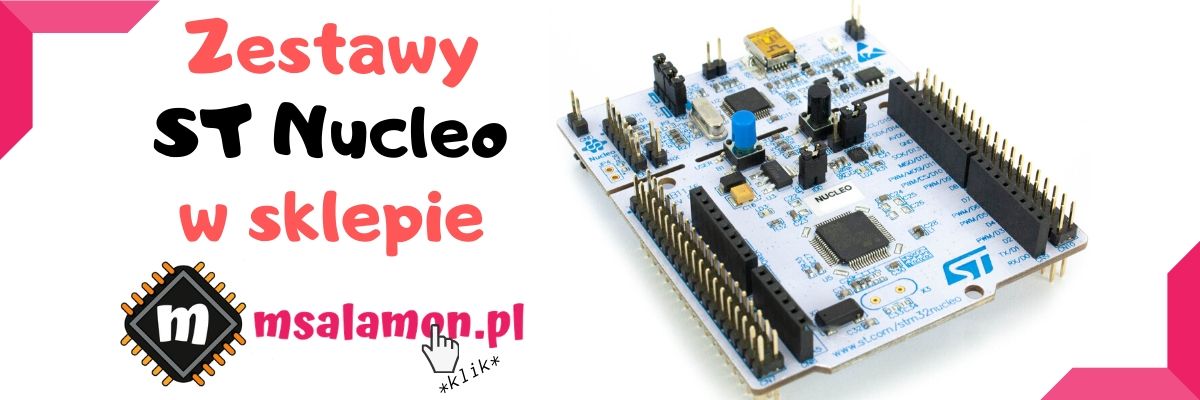
Discovery boards are also available. They’re a bit richer in external components, such as accelerometers, microphones, or displays. They also generally have larger and more powerful microcontrollers. You can also consider such a board as a beginner.
The last group of boards I can recommend is the Chinese BluePill. It’s a really small board with a powerful STM32F103 microcontroller. Its biggest drawback is the lack of a programmer. You have to buy it separately or, if you have one, use the one from an ST kit.
Peripheral components
You need to connect something to this microcontroller. In kits there’s usually only one LED and sometimes a button. You won’t do great things with that. The only exception is the aforementioned Discovery.
In my opinion you’ll need, for example:
- Some breadboard — it’s more convenient to make connections on a board than to have everything hanging in the air
- LEDs, relays — turning devices on and off, lighting effects.
- Displays — 16×2 LCD is already old, but it can do. Besides that, I recommend OLED and some TFT.
- Sensors — they bring the most joy. Accelerometers, temperature, pressure, humidity, light intensity, smog. There’s a ton of them.
Basically, you can try connecting anything you want. With STM32 you have so much power that you won’t run out for a long time.
Software
You have to write these programs in something. Fortunately, ST supports its microcontrollers very vigorously. They have quite a substantial set of software to assist in creating projects.
ST MCUFinder
The first of such small programs is ST MCUFinder. A very useful tool for finding the right MCU for our project. ST has released so many chips that it’s hard to remember them all.
STM32CubeMX
A tool used to generate the initial code. A pleasant graphical interface lets you configure all the microcontroller peripherals in a convenient way. You don’t need immense knowledge to perform the basic settings. At the end, from what you click through, an entire project will be generated, tailored to the previously selected IDE. In this project you’ll find all the necessary drivers and peripherals configured just the way you wanted. Sweet.
STM32 ST-LINK Utility
A program for operating the ST-Link programmer. It contains the necessary drivers for the programmer. From it you can erase or flash your code. Besides that, it gives, for example, the ability to lock the flash memory to protect the program from unauthorized copying.
IDE
Here the choice is large. Recently ST released its own IDE called STM32CubeIDE. I’ve been using it for some time and I think I’ll soon publish my review of it.
I described the other environments or editors recently on the blog in the post: IDE or not IDE — the 8 best IDEs for STM32. Worth checking out.
Where to get knowledge?
There are plenty of good sources of knowledge. I can’t help much with English, but I recommend lots of practice. For the C language at the very beginning, the absolute basics are enough. A C course doesn’t have to be strictly for microcontrollers. It can be programming on a PC. This one, for example. C is such an old language that there’s no reason to go only for the newest courses 🙂
As for STM32, the first thing that comes to mind is books. Not long ago I reviewed one. It’s a good approach, but unfortunately it becomes outdated very quickly. Technologies advance so fast that paper sometimes can’t keep up. Of course, the foundational knowledge rarely changes, but starting your journey from scratch you won’t be eager to wonder whether the libraries are still supported and whether the IDE is still usable. As for the language of books, in Poland you can find relatively few titles. I recommend catching the bug in Polish and deepening it in English.
You can read blogs such as mine. Unfortunately, such a solution is bad for one reason — the knowledge is not systematized or laid out step by step. Each post is most often devoted to one topic and doesn’t really connect with the others. It’s an ideal way to complement your knowledge.
Of course, series of blog posts appear that are combined into courses. Even in Poland a few quite good ones have appeared, but not as good as we’d like. I have one reservation about a written course. It’s hard to sense the author’s emotions and what they meant in certain moments. It’s good when such a course has lots of screenshots with schematics, charts, etc.
Besides reading, I strongly recommend tutorials in video form. Nothing replaces the student–teacher contact, even if it’s virtual. There are tons of YouTube channels with short tutorials and descriptions. Unfortunately, similar to blogs, the knowledge may be unsystematized and it will be hard for a beginner to figure out what to do first. Additionally, the vast majority of good materials about STM32 are outside our country and — along with that — in English.
There’s also such a thing as online video courses. Lately this form of passing on knowledge has become very popular. I myself have taken several courses on various topics and I believe a well-made course teaches best. Unfortunately, I haven’t seen a solid STM32 course in Polish. On Udemy in English, these courses don’t inspire my confidence either. That’s why, especially for my readers, I decided to create such a course in Polish (this online course is conducted in Polish). Before the course is finished, I’ve prepared a document in which I’ll help you create your first project on STM32. You can download it by clicking the banner.

Podobne artykuły





0 Comments