While further developing the library for the nRF24L01+ module, I decided to use ring buffers. I figured that this is a good moment to first introduce you to the topic before I show how I implemented them for radio communication. What is this data storage structure and how do you use it?
Ring buffer
They call it different things: circular, cyclic, ring. All of these names generally refer to the same thing. What is it, really, and why not just use a regular array?
Exactly. You can just put data into an array and read that array. The simplest solution and probably sufficient in many places. The problem comes when we ask ourselves a few questions:
- Where in the array should I put new data, or read from?
- How many elements can I still write into the array?
- Is the current position the current fill level?
- If I read a byte from position zero, should I write the next new data there, or at the end?
- Have the data in the array already been read/used?
- What if I fill the array? I have to remember its size so I don’t go out of range.
There can be many more such questions. Arrays are great for temporary things like a buffer that we’re about to push to UART. In that case I always use an array in a one-shot manner.
A ring buffer will be useful if we want our data to live longer and across a larger part of the program. Besides, it brings order, because things like the amount of unprocessed data or overflow are taken care of automatically.
For example, when communicating with the nRF24, data that arrives at a “random” moment via an interrupt lands in the receive buffer, and we don’t want to deal with that data in the interrupt service routine. We can, for example, handle it after some specific character arrives. We’ll process it only when there’s appropriate time. Before we deal with it, more data may arrive. We need to store it all somewhere.
Now the other side. We want to transmit something via the nRF24. We can simply write what we want to send into the chip and it will send it. What if we have more data to send than the chip can transmit at once? Wait idly for the first packet to be sent? Of course we don’t like waiting like that 🙂
You can write 100 bytes into the ring buffer and send them in chunks at moments when there is time and the transmitter is free. The sending procedure should fetch data from the buffer by itself without involving us.
How a ring buffer works
A ring buffer is basically a FIFO queue (First In First Out). This means that the data you write to the buffer is the first data that will be taken out of it. FIFOs are one of the most popular buffering forms.
So why “ring” or “cyclic”? Because the theoretical arrangement of the data resembles a circle 🙂 This is well visualized by the image from Wikipedia:
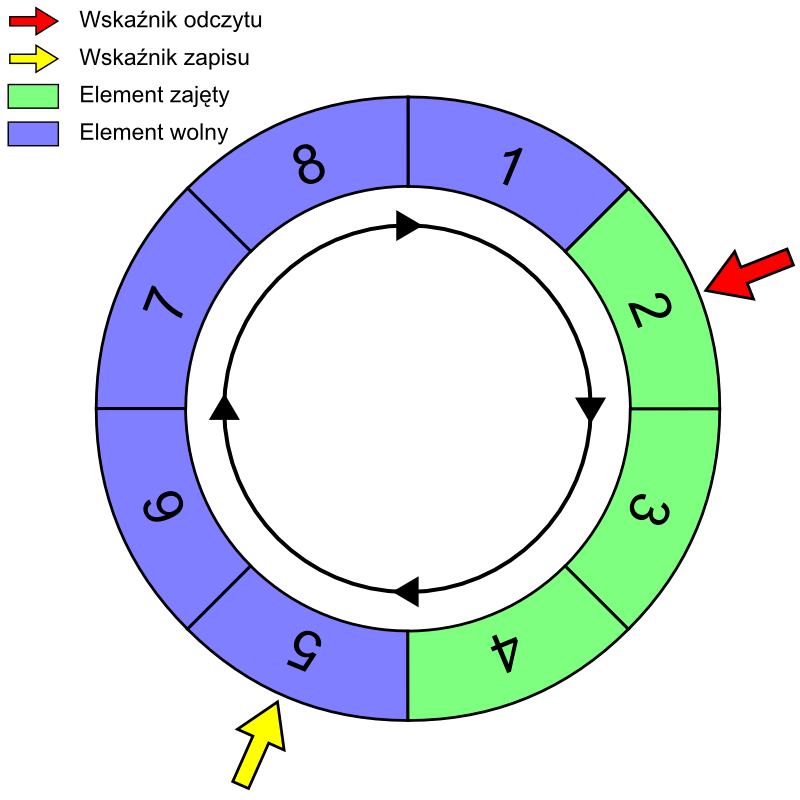
In the picture you have a cyclic buffer of size 8 bytes. Look at the yellow arrow, which is the pointer to the next write. When it reaches byte no. 8, the next place to write in the buffer will be byte no. 1. Similarly for reading. Passing the eighth byte will cause the next one to read to be the first byte. That’s where the circular interpretation of this data structure as a circular space comes from.
How do you make a cyclic structure in memory?
Unfortunately, that cyclic nature in theory cannot be directly translated into memory in a microcontroller. RAM in an MCU is contiguous and much larger than our buffer. The buffer, in turn, is somewhere in the middle of memory. Let’s assume we have this 8-byte buffer at addresses 0x10÷0x17. If the write pointer is at address 0x17, then writing a byte there and incrementing will not automatically “roll back” to 0x10. Normally this pointer will land at 0x18, i.e. it will go out of the array. That’s exactly what we don’t want.
We need to help the pointer return to position zero. How do we do that? After incrementing the pointer, check whether it went out of range. You can do this in two ways:
- Using if(WritePointer > BufferSize-1) { WritePointer = 0};
- Simply perform modulo division on the pointer: WritePointer %= BufferSize;
I always choose the second variant. Modulo division by the buffer size will never allow you to go beyond the bounds of the array size.
Helper elements of the buffer
You’ve probably already noticed that we need something more than just the array we’ll be writing to. We need write and read pointers. What are they for?
We want writing and reading from the buffer not to depend on providing the index of the cell we want to use. It should happen in the background, away from the user. So the structure itself must remember which cell the next byte should be written to, and which one should be read from.
These pointers are Head and Tail. The naming most likely comes from a snake. The head of the snake is where subsequent data will be written, the tail points to the first byte to be read.
You probably played Snake on a Nokia, right? Do you remember what it means when the head catches up to the tail? Game Over. It’s similar here. If the head catches up to the tail, it means there is no more space in the buffer.
On the other hand, you’ll reach such a Game Over when trying to read from an empty buffer, i.e. when the tail catches up to the head.
You can detect these two extreme situations and handle them somehow. More often you will deal with the empty buffer—after all, we aim to process all data contained in it. Then it’s worth signaling that there’s nothing to read.
So what will our buffer look like at this point? It will be a structure with an array and two “pointers” addressing that array. This is the simplest form of a buffer.
#define BUFFER_SIZE 32

typedef struct
{
uint8_t Buffer[BUFFER_SIZE];
uint8_t Head;
uint8_t Tail;
} RingBuffer;
Writing to the buffer
From the point of view of using the buffer, we really need two functions: writing and reading a byte from the buffer. I’ll take writing first.
A freshly created structure has zeros in its fields, so the Head and Tail pointers point to the first cell of the buffer array. To write something to the buffer you must:
- Make sure there is space
- Write the data into the next free place
- Increment the write pointer, remembering the “cyclic” nature
And that’s it! How do you make sure we have space to write? There are several ways, including adding an additional field in the structure that counts the number of elements in the buffer, which is quite a good solution.
However, the simplest method will be to check whether the next write pointer in order (the head) will “hit” the snake’s tail.
int8_t WriteToBuffer(RingBuffer *Buffer, uint8_t Data)
{
	uint8_t TempHead;

	TempHead = (Buffer->Head + 1) % BUFFER_SIZE;

	if( TempHead == Buffer->Tail) // No room for new data
	{
		return -1;
	}
	else
	{
            // Write to buffer
	}

	return 0;
}
A helper variable TempHead helps me with this, where I keep the computed next head position. You can do without it, but this will be more readable. Next, I compare it with the current tail and if they are equal I return error -1. If they are different, it means there is space and we can write.
The first point from the list is satisfied. What do the second and third points look like, i.e. writing and incrementing?
Buffer->Buffer[Buffer->Head] = Data;

Buffer->Head++;
Buffer->Head %= BUFFER_SIZE;
Knowing there is space, I can safely write the byte and increment the write pointer to the next “free” cell.
So the whole function looks like this
int8_t WriteToBuffer(RingBuffer *Buffer, uint8_t Data)
{
	uint8_t TempHead;

	TempHead = (Buffer->Head + 1) % BUFFER_SIZE;

	if( TempHead == Buffer->Tail) // No room for new data
	{
		return -1;
	}
	else
	{
            Buffer->Buffer[Buffer->Head] = Data;

            Buffer->Head++;
            Buffer->Head %= BUFFER_SIZE;
	}

	return 0;
}
Reading from the buffer
Now it would be good to read a byte that is already written into the buffer. Reading is analogous to writing, except I don’t check whether there is space in the next cell, but I check whether Tail has already become equal to Head. If so, there is nothing to read.
int8_t ReadFromBuffer(RingBuffer *Buffer, uint8_t *Data)
{
	if( Buffer->Tail == Buffer->Head) // No data to read
	{
		return -1;
	}
	else
	{
		*Data = Buffer->Buffer[Buffer->Tail];

		Buffer->Tail++;
		Buffer->Tail %= BUFFER_SIZE;

		Buffer->Elements--;
	}
	return 0;
}
How many bytes fit in such a buffer?
It may seem simple and obvious that if I have a 32-byte array, then I can fit 32 bytes.
Well, no. In such an array I can store 31 bytes. Notice that when writing, if there is no free space in front of the write pointer, I won’t write anything into the current position. That’s why one byte must always be “free”.
Why did I do it this way? Just ask a simple question: If Head and Tail are equal, is the buffer full or empty? Here lies, contrary to appearances, a solid problem that cannot be solved without additional indicators. There are at least three solutions, or at least that many I know at the moment:
- Using one “free” byte in the array as an empty/full indicator. That’s what I did in the examples here.
- Counting elements on write and subtracting them on read in an additional structure field. Effective as long as we don’t heavily use the buffer with interrupts or an RTOS. Then additional synchronization methods are needed. Bonus: we easily know how much data is available in the buffer before we start reading it.
- Combining the two methods above. That’s what I ultimately used with the nRF24 because of the bonus.
Additional functions of ring buffers
You can add many interesting helper functions depending on the application. These can be things like:
Returning the number of elements in the buffer / free slots. Useful when reading the entire buffer.
Flush, i.e. clearing the buffer. Zeroing Head and Tail in the event of an error. For example, when the element counter diverges from the actual buffer state (based on the pointers) or on overflows.
Dynamic buffer size. I mean generating several buffers of different lengths, not dynamically adding and removing elements.
If you know any other interesting functions, let me know in the comments.
Summary
A cyclic buffer is one of the nicer methods of buffering data. Very often you can use this method to collect data from sensors. You collect in an interrupt, and for example after collecting 100 samples, you read them all and process them elsewhere in the program.
I encourage you to experiment and improve the buffer. Also adding or removing functions depending on the project’s needs is cool. I usually do 🙂
This time I’m not posting code. A buffer a bit more expanded than here in the article will be in the third part about the nRF24 coming soon.
If you noticed an error, disagree with something, would like to add something important, or simply feel like you’d like to discuss this topic, write a comment. Remember that the discussion should be polite and in accordance with the rules of the Polish language.
Podobne artykuły






0 Comments